
Dolt is the world’s first version-controlled SQL database. Along with familiar SQL operations, it lets you branch, diff, merge, and commit your data. Dolt also supports remotes, which act as copies of your database stored in another location that you can share and synchronize using push, pull, and clone.
A remote can live on a filesystem, in cloud storage, or behind a remote server. You don’t need a running SQL server to share a database. For example, you can clone a database from DoltHub, make a change locally, and push your commit back:
dolt clone ericrichardson/stocks
cd stocks

dolt sql -q "
INSERT INTO ohlcv
  (date, act_symbol, open, high, low, close, volume)
VALUES
  ('2026-10-07', 'EXAMPLE', 100.00, 105.00, 98.50, 103.25, 1500000);
"

dolt add .
dolt commit -m "Add data to ohlcv table"
dolt push
After this, the new commit and diff appear on DoltHub:
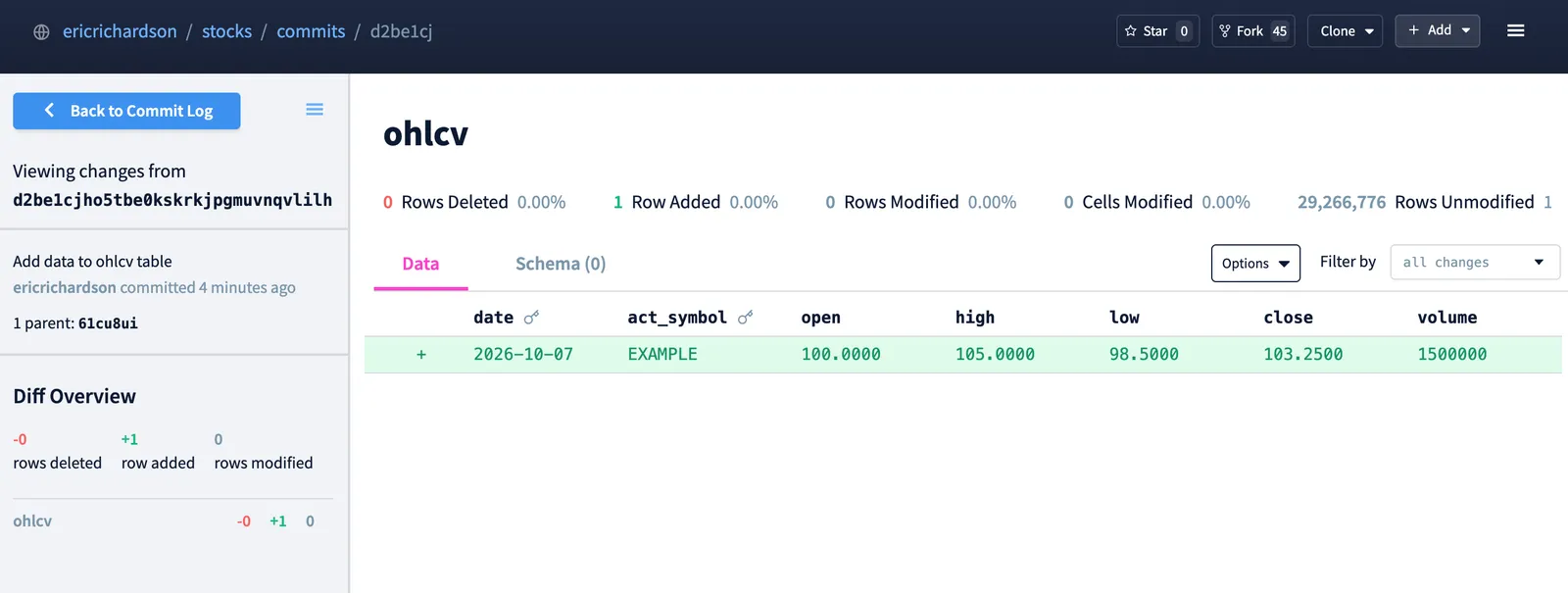
If you’ve used Git, this workflow should look familiar. But a database can contain hundreds of gigabytes or even terabytes of data. What does it mean to “push” a database after changing just a few rows? Does Dolt upload the whole database? Does it send the SQL statement? What actually arrives at the remote, and how does it get there?
The answer to these questions starts with how Dolt stores data. In this article, we’ll look at how Dolt databases become chunks and files, then follow a dolt push from your local database to a remote.
How Dolt Stores a Database Version#
Dolt stores table rows and indexes in a data structure called a prolly tree. Prolly trees organize key-value pairs into a hierarchy, where leaf nodes contain the actual data and internal nodes contain keys and references to their children.
These nodes are serialized into chunks, which Dolt identifies by hashes of their contents. This is called content addressing, and it’s what lets Dolt recognize identical data and share it across database versions. A parent node stores its children’s hashes, so changing a child also changes the contents, and therefore the hash, of its parent.
When we insert a row, Dolt creates new nodes for the affected portion of the tree as well as the path back to the root. The previous version remains intact, and both versions share the unchanged nodes.
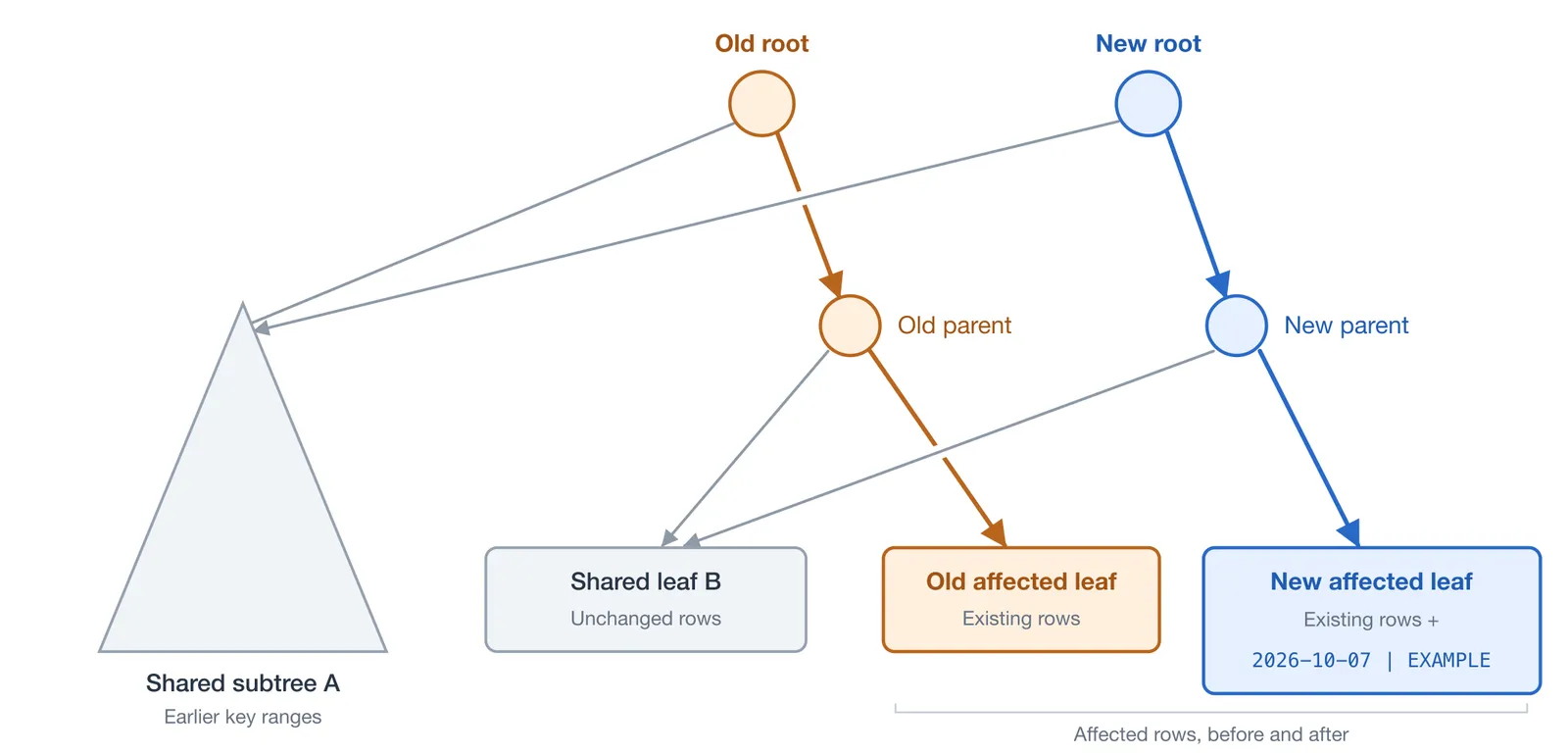
A commit records a reference to the database snapshot and its parent commits. Commits and other metadata are also stored as content-addressed chunks. This allows Dolt to determine exactly which pieces of the database a remote already has. During a push, Dolt uses chunk hashes to check which pieces are already present on the remote and then transfers only the missing chunks needed for the incoming commit, including any missing history. For more information on prolly tree internals, check out our docs or build your own using our prolly tree visualizer.
This explains how Dolt identifies and shares the pieces of a database version. But chunks aren’t stored as millions of individual files. Next, we’ll look at how Dolt packs them into storage files and keeps track of where to find them.
How Chunks Become Files#
To start, it’s important to distinguish a SQL table from a storage file. Storage files aren’t organized as one file per SQL table. Instead, each file packages together many chunks, which could potentially be scattered across different tables and commits. Dolt’s prolly tree structure determines which chunks make up a specific table, and storage files determine where those chunks physically live. Conceptually, a chunk is the smallest logical unit of content-addressed data in a Dolt database.
With this in mind, let’s go over the pieces of a storage file. Broadly speaking, there are three core components:
- Chunk Data - the compressed contents of many chunks.
- Index - a map of chunk hashes to their locations inside the file.
- Footer - information needed to interpret the file and locate its index.
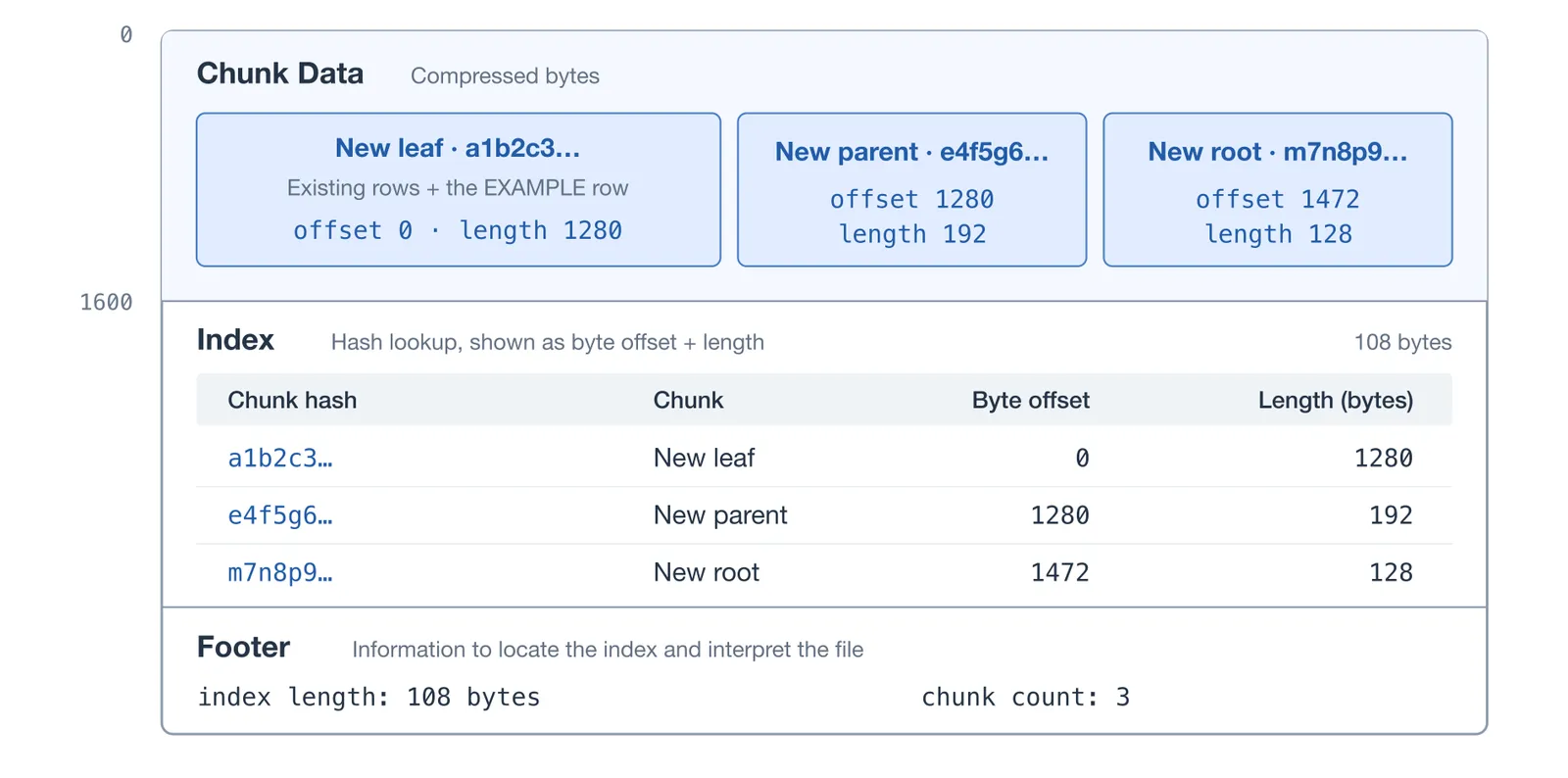
So, given a storage file, any chunk can be quickly identified within the file using the following procedure:
- Read the footer to obtain the information needed to locate the index
- Determine the index’s position and read it
- Look up the desired chunk hash to find its byte offset and length
- Read the chunk
Now that we know how to locate a chunk within a file, how do we know which file a chunk belongs to? This is where the manifest comes into play. The manifest tracks the database’s storage files as well as its current store-root hash. The store root identifies a map of references, including branches and their current commits. Each commit references the root of the database at the point the commit was made, which leads to the tables and their prolly trees.
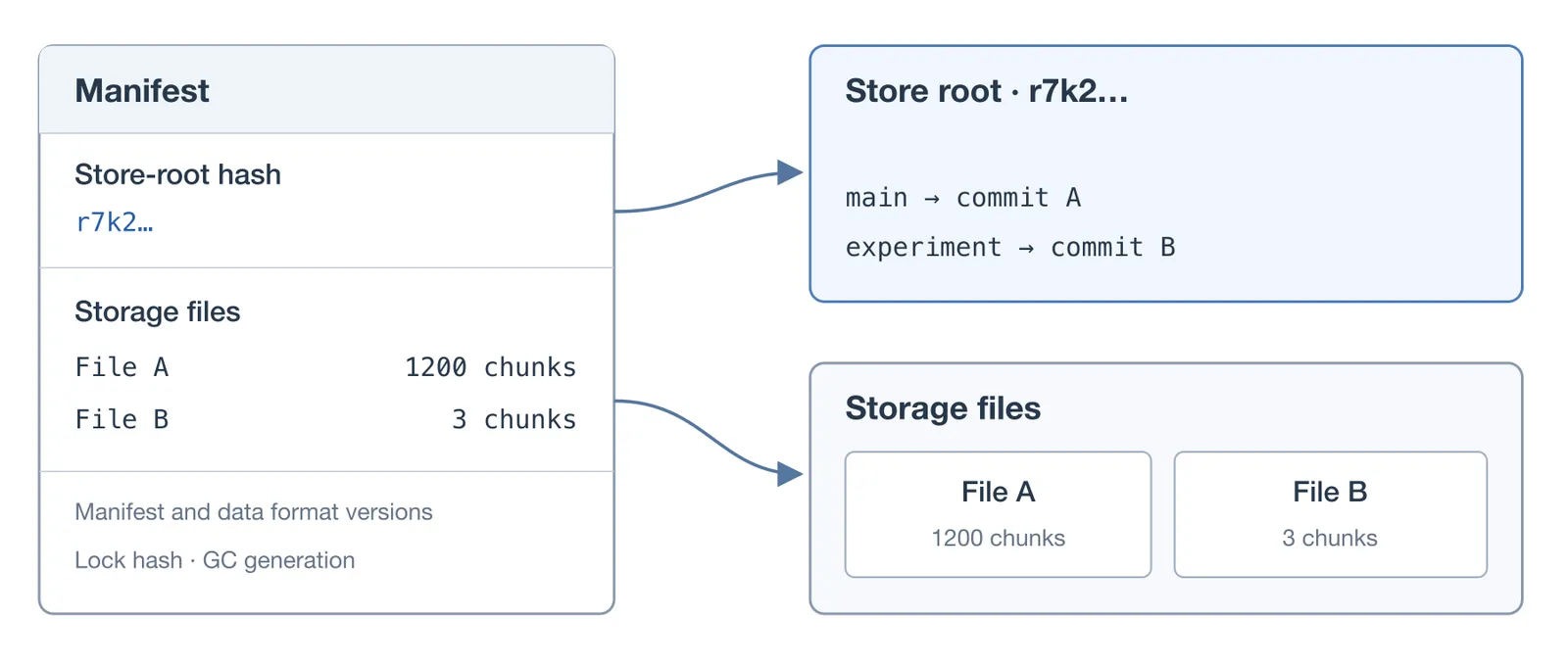
To locate a chunk, Dolt consults the indexes of the files identified in the manifest until it finds the matching hash. These indexes can be cached in memory, so checking whether a file contains a chunk does not necessarily require a disk read. With this information, Dolt is able to quickly retrieve chunks associated with any particular version of the database.
In summary, storage files hold immutable chunks. The manifest tracks which files are available and which store root is current. Changing the contents of a chunk produces new chunks with new hashes. When data changes, those changes propagate through the affected tree nodes to a new root. A new commit references that new root. Advancing a branch to that commit then creates a new store root, which reflects the updated reference map. This makes the update visible.
Now, we’ve spent a lot of time discussing how Dolt storage works and not much on remotes. That’s because remotes operate on the same storage model: chunks, storage files, and references. With this context, let’s look at how Dolt accesses this data across different types of remotes.
Remote Types#
On a remote, the database is represented using the same underlying storage model as a local database. It contains content-addressed chunks that are packed into storage files, along with a manifest that identifies active storage files and the current store root. The way those files and metadata are stored and accessed may vary depending on the type of remote, but the storage model itself is logically identical. Below is a summary of the differences between each of the major remote types:
Filesystem Remotes#
In this arrangement, the remote database is stored in a directory accessible to the Dolt client. This can be on the same machine or a mounted filesystem. For example, file:///ericrichardson/remotes/stocks indicates that the remote directory is located at /ericrichardson/remotes/stocks.
With this setup, the Dolt client itself performs storage operations directly. It reads the manifest to determine active storage files and locates byte ranges for chunks the same way it would for a non-remote database. Pushes create storage files and update manifest state using normal filesystem locking and atomic operations. No separate Dolt process is required at the destination.
Cloud-Storage Remotes#
These work similarly to filesystem remotes, but the Dolt client accesses storage through the cloud provider’s APIs. Storage files become objects in a bucket, and the client can request byte ranges from an object rather than downloading entire storage files.
The location of the manifest may depend on the backend. As an example, Dolt’s aws:// backend keeps storage files in S3 and the manifest in DynamoDB. Writes upload new storage file objects and perform compare-and-swap updates on the manifest. Importantly, the client still understands the storage format and uses the same chunk-lookup logic, just with cloud API calls instead of filesystem reads and writes. The cloud provider simply supplies storage and the coordination mechanisms necessary for safe writes.
Remote Servers#
This moves some of the work typically done by the Dolt client behind an API. Instead of accessing storage directly, the client asks a service to perform operations on its behalf. DoltHub is an example of this setup.
The remote server protocol defines a set of operations necessary to perform remote operations. To check whether chunks exist, the client sends a request with their hashes, and the server responds with which chunks are missing. To read chunks, the client requests their locations, and the server responds with download URLs, byte offsets, and lengths. For writes, the API provides upload locations, the client transfers files, then the API registers those files and publishes store root updates. If you’re curious, you can check out the full remote API definition here.
Regardless of the remote setup, the client needs access to the same basic operations: checking for chunk existence, reading chunks, writing chunks, and updating the manifest state. The main difference comes from whether or not the client performs those operations directly or delegates them to a server. Now, let’s follow exactly what happens after we run dolt push.
Inside dolt push#
Back to our original example, we’ve inserted one row into a table and committed that change. At this point, our local branch now points to that new commit, while the same branch on the remote still points to the previous one. Our goal is to make the new commit and its associated data available on the remote branch. To do this, we run dolt push.
Since we started by running dolt clone, Dolt has already configured a remote named origin. We can see where it points with dolt remote -v:
dolt remote -v
origin https://doltremoteapi.dolthub.com/ericrichardson/stocks
Our local branch also tracks its remote counterpart, so dolt push already knows where to send our commit. We can specify the remote and branch explicitly with:
dolt push origin masterOn push, Dolt starts by opening the remote storage backend and accessing the remote’s version of the manifest. This includes the store root on the remote and the branches reachable from it. At this point, Dolt knows both the commit we want to push and the commit the remote branch currently points to.
Before transferring the new chunks, Dolt first performs some validations to ensure the proposed update is allowed. For a normal push, the current commit on the remote branch must be an ancestor of our local commit (i.e. a fast-forward update). If someone else pushed changes that are absent from our local history, Dolt will reject the push so we can first fetch and reconcile those changes.
Next, Dolt begins identifying data that the remote needs. Starting from the new commit, it follows references through the chunk graph and checks whether those newly encountered chunks are present on the remote. If a chunk is already present on the remote, Dolt can immediately stop exploring that path. This is thanks to content-addressing. Because chunks are content-addressed, the same hash identifies the same contents, including the same references to other chunks.
This is where the structural sharing described earlier becomes useful. The remote already contains the vast majority of the data needed by our new commit. In the simplified prolly tree diagram from earlier, the unchanged subtree and leaf are already present locally and on the remote. The missing data consists of the new leaf containing our newly added row, the affected parent node chain, updated metadata, and the new commit itself.
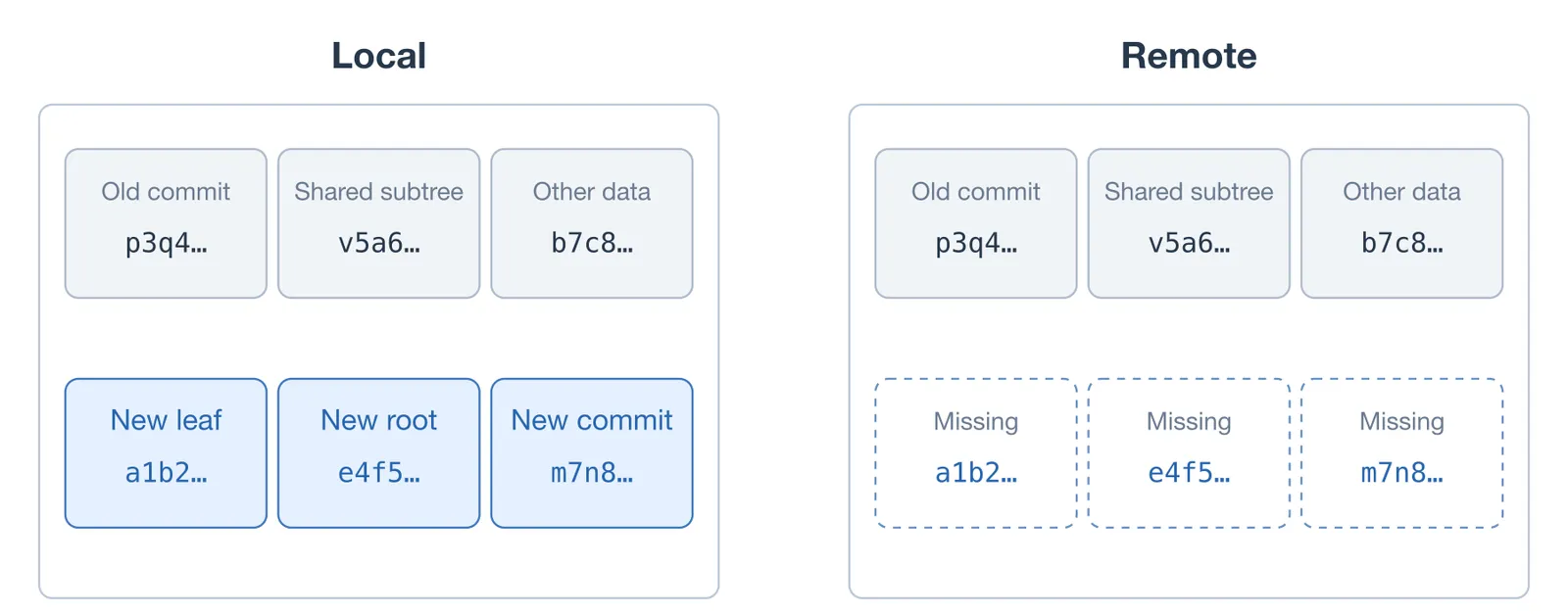
As missing chunks are identified, Dolt packages them into storage files for transfer. Note that the distribution of chunks across storage files locally has no effect on the organization of chunks across storage files on the remote. Chunks that exist across any arbitrary number of storage files locally may be packaged into a single storage file for transfer on push. Chunk hashes identify data independently of how it is packaged.
Dolt proceeds to transfer the new storage files to the remote and register them in the manifest, making their chunks available for lookup. At this point, the remote has the new data, but its branch still points to the previous commit. Making chunks available and publishing a branch update are separate operations. To finalize the push, Dolt updates the remote’s reference map so the destination branch points to our new commit. It stores the updated map and publishes its new store-root hash in the remote’s manifest.
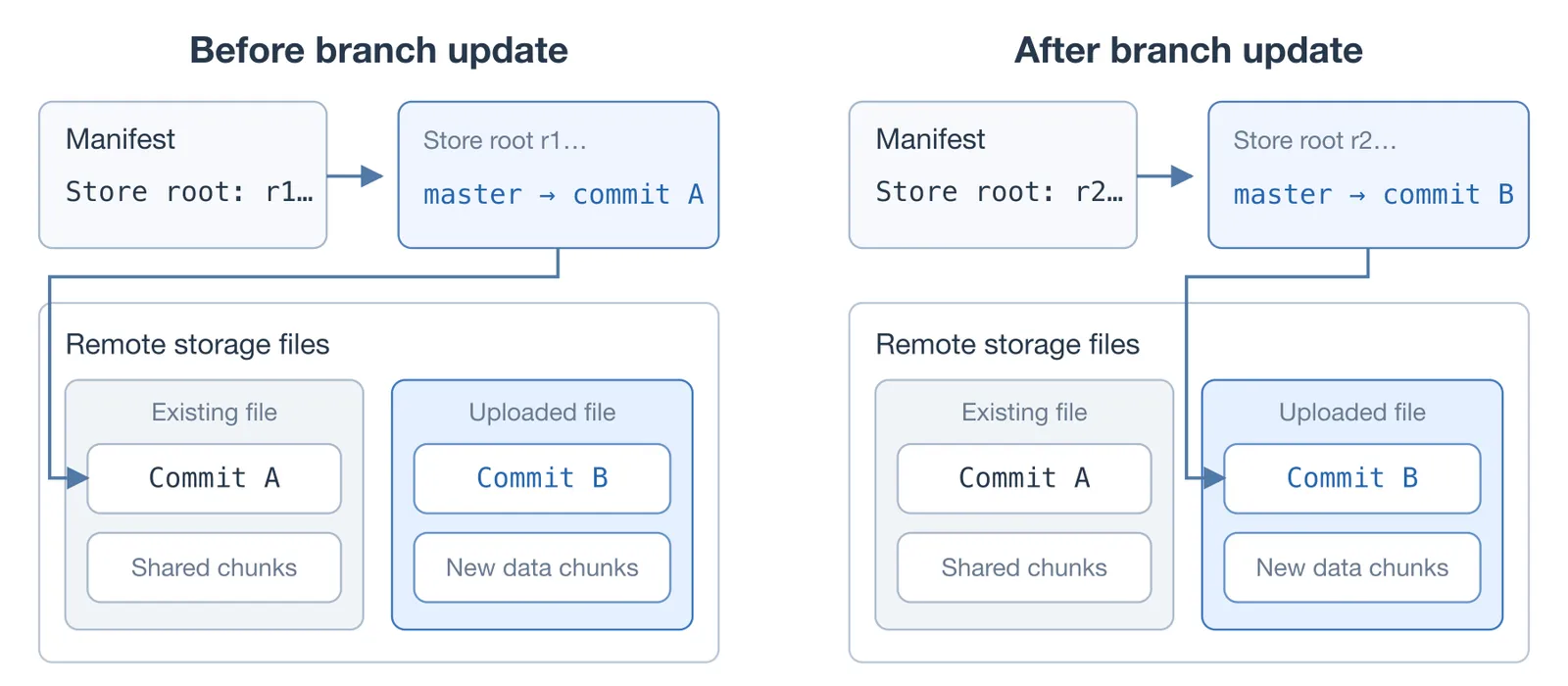
After this step, the remote branch points to our new commit, and the chunks required to read it are already available. Dolt updates our local remote-tracking reference to account for the successful push. At this point, another machine running a fetch, clone, or pull will now obtain our commit with the new row we inserted.
Although we’ve focused mostly on push here, it’s easy to see that fetch, pull, and clone work largely the same way, just in the opposite direction. Fetch transfers missing chunks from the remote into our local database and updates our remote-tracking references. Pull performs a fetch, then merges the fetched changes into our local branch. Clone creates the initial local copy and downloads the remote’s storage files directly.
What Could Go Wrong?#
The astute reader may have realized that each push can add new storage files to the remote. If those files kept accumulating without bound, chunk lookups would become more expensive because Dolt would have more file indexes to check. To keep the file count manageable, Dolt uses a process called conjoin.
Conjoin combines multiple storage files into a larger file and builds a new index for their chunks. It then updates the manifest’s active file list, replacing the original files with the combined file. The chunks keep their hashes, so commits and references remain unchanged. The only thing that changes is the physical arrangement of data.
Conjoin runs in both local and remote storage. The remote API implementation used by DoltHub checks whether conjoin is needed when the file count exceeds its default threshold of 256. Combining files sounds straightforward, but safely replacing them while handling multiple storage backends is tough to get right. For more on those details, see Conjoin Means Bugs.
Conclusion#
Remotes build on the same storage model that makes version control possible in Dolt. We’re currently in the process of making Doltgres and DoltLite databases available on DoltHub, which involves new remote server implementations for those databases. If you have any questions about Dolt remotes, come by our Discord and let us know.