
Beads is a popular CLI utility backed by Dolt that allows coding agents to self-manage tasks and persist data to a durable store, extending their memory.
It was created by Steve Yegge in 2025 and has undergone numerous changes as it’s been battle-tested by users and built into more complex orchestration layers like GasCity.
Because the speed of development on Beads is so fast, and the project is open-source and entirely vibe-coded, it hasn’t always been the most stable tool. Fortunately, in its more recent releases a large and ongoing effort has been made to stabilize the tool and greatly improve the user experience for both coding agents and their human drivers.
In that vein, today’s blog is a preview of a new backend mode in Beads that will be available to try in the next Beads release, which will eventually become the new default backend for the tool. This new mode aims to greatly simplify the management of Beads’ persistence layer, and provide a clean abstraction for Beads developers to more easily read and write data. This new mode is called proxied-server mode.
Beads’ Backend Modes#
The name “proxied-server” mode is only to distinguish it from Beads’ existing “server” mode, which will eventually be deprecated once “proxied-server” mode is no longer experimental and is feature complete.
In Beads today there are three backend modes, that is, ways that the Beads CLI manages, connects to, and writes to its persistence layer Dolt. The default mode is “embedded” mode, which makes all writes and reads to a local directory on disk. Then there is “server” mode, in which Beads will start and manage a Dolt sql-server which it will use for persisting data. The third mode is similar to “server” mode in that it also starts and manages a Dolt sql-server but makes it a host-global server and all Beads clients on that host share that same server. This mode is called “shared-server” mode.
You might be wondering why there are so many “backend modes” and also why on earth Beads needed a new one, especially when all of this stuff should be opaque to the end user.
Embedded mode is the default mode because it’s the simplest architecturally, doesn’t require any server management, and “just works” out-of-the-box. The only reason to not use the default embedded mode is if you plan on doing multi-process concurrency with Beads. For this use-case, embedded is an inferior choice since it is single-threaded and will block until it can acquire the write lock.
If you want multi-process concurrency, you need either “server” or “shared-server” mode. This gives you non-blocking concurrency with Beads, cause they run against live database servers, and multi-process concurrency is a fundamental requirement for agentic coding orchestrators that need to run maybe hundreds of agents on Beads. To support this use-case, in these two server based backend modes Beads manages the server lifecycle on behalf of the user but has traditionally done this rather poorly.
There have been many historical instances of “zombie” servers left running, or hundreds of additional servers spawning needlessly. Additionally, the primary interface Beads uses today to interact with these servers and their data has done two things poorly: it couples server lifecycle management with data access methods, and does not provide flexible and ergonomic database transaction and Dolt commit management, which limits the functionality of Dolt that Beads aims to leverage.
So, to address these issues with Beads’ existing server implementations, I’ve added proxied-server mode which eliminates these issues.
Proxied-Server Mode#
Proxied-server mode is similar to the other server modes in Beads only in that it manages the lifecycle of the Dolt sql-server for the end-user, so they don’t need to do so.
It is different from these modes, however, in that to manage the Dolt sql-server, it actually deploys a local temporary service whose sole responsibility is managing the database server, making sure it’s alive when a request comes in, and down, when there’s no request. This is essentially the Beads managed “proxy” to the database server, hence the name of the mode. I am really excited about this design because it ensures Beads’ users never need to think about the database server again, they can just use the tool and everything will just work as expected.
Furthermore, not only does this new mode simplify and improve server management so it’s a non-issue, but it also improves Beads’ write performance and Dolt commit boundaries.
In the existing server modes, a single Beads command could produce multiple Dolt commits, and those commits were not logically scoped to a single bead, for example. You can think of this as writing a file to Git, but making a Git commit for every line change, instead of making a single commit at the end of a logical editing block.
This is fixed in Beads’ proxied-server mode, which enables structuring writes and commits more correctly. The goal here is to make it so you can diff a bead, and not have to view the diff of multiple commits to see how a bead changed over time.
Ok, so how do you use this new mode?
A caveat before we dive in: this mode is still technically “experimental” but we are committed to making sure it works for your production needs, so let us know if you hit any issues or bugs with it.
This mode also does not support everything that the other server modes do, some of this is by design. If there is a command or feature you want supported in proxied-server mode, please file an issue on the Beads repository, or come by the Gastownhall Discord.
Getting Started#
Again, this feature is on Beads main but is not yet available in a release. I am currently building from main for this demonstration configuration.
➜  blog_example git:(main) ✗ bd version
bd version 1.1.0 (dev: 70e329d8b381)
So, first have Beads installed from main then, if this is a new Beads repository for you, you can simply run bd init --proxied-server to initialize Beads in proxied-server mode.
➜  blog_example git:(main) bd init --proxied-server
migrating schema: 0001_create_issues.up.sql
...
✓ bd initialized successfully!

  Backend: dolt
  Mode: proxied-server
  Database: blog_example
  Issue prefix: blog_example
  Issues will be named: blog_example-<hash> (e.g., blog_example-a3f2dd)

Run bd quickstart to get started.
That’s it really, you can just start using Beads as normal.
➜  blog_example git:(main) bd list
No issues found.
➜  blog_example git:(main) bd create "example issue 1" -d "this is an example" -p2
✓ Created issue: blog_example-ro6 — example issue 1
  Priority: P2
  Status: open
➜  blog_example git:(main) bd list
○ blog_example-ro6 ● P2 example issue 1

--------------------------------------------------------------------------------
Total: 1 issues (1 open, 0 in progress)

Status: ○ open  ◐ in_progress  ● blocked  ✓ closed  ❄ deferred
Whenever you run a bd command, the proxy service ensures the database server comes online, and when the service has been idle for some duration, it all shuts down. There’s no need to muck with config or ports or anything like that unless you’re a power user and you need to.
If you have an existing Beads repository that is using either “server” or “shared-server” mode, you can also easily flip over to “proxied-server” mode using the bd migrate command.
In the example below my Beads repository is using “server” mode.
➜  migrate_example git:(main) bd init --server
migrating schema: 0001_create_issues.up.sql
...
✓ bd initialized successfully!

  Backend: dolt
  Mode: server
  Server: root@127.0.0.1:45643

  ⚠ Server host defaulted to 127.0.0.1.
    If your Dolt server is remote, set BEADS_DOLT_SERVER_HOST or pass --server-host.
  Database: migrate_example
  Issue prefix: migrate_example
  Issues will be named: migrate_example-<hash> (e.g., migrate_example-a3f2dd)

Run bd quickstart to get started.

➜  migrate_example git:(main) bd list
No issues found.
➜  migrate_example git:(main) bd create "example issue 1 on server mode" -d "this is an example on server mode" -p2
✓ Created issue: migrate_example-6do — example issue 1 on server mode
  Priority: P2
  Status: open

💡 Tip: Install the beads plugin for automatic workflow context, or run 'bd setup claude' for CLI-only mode
➜  migrate_example git:(main) bd list
○ migrate_example-6do ● P2 example issue 1 on server mode

--------------------------------------------------------------------------------
Total: 1 issues (1 open, 0 in progress)

Status: ○ open  ◐ in_progress  ● blocked  ✓ closed  ❄ deferred
To change it to “proxied-server” mode I first run bd dolt stop to take the live server down, then run bd migrate from-server-to-proxied-server.
➜  migrate_example git:(main) bd migrate from-server-to-proxied-server
✓ Switched to proxied-server mode

  Data directory unchanged: /home/dustin/cursor_src/repros/migrate_example/.beads/dolt
  The proxy starts automatically on the next bd command.
➜  migrate_example git:(main) ✗ bd list
○ migrate_example-6do ● P2 example issue 1 on server mode

--------------------------------------------------------------------------------
Total: 1 issues (1 open, 0 in progress)

Status: ○ open  ◐ in_progress  ● blocked  ✓ closed  ❄ deferred
There is also from-shared-server-to-proxied-server to migrate from the shared-server mode to proxied-server mode.
In the event something is not working correctly or supported in proxied-server mode, you can easily migrate back to server mode (or shared-server) mode with from-proxied-server-to-<mode>.
➜  migrate_example git:(main) ✗ bd migrate from-proxied-server-to-server
✓ Switched to server mode

  Data directory unchanged: /home/dustin/cursor_src/repros/migrate_example/.beads/dolt
  The dolt sql-server starts automatically on the next bd command.
➜  migrate_example git:(main) bd list
○ migrate_example-6do ● P2 example issue 1 on server mode

--------------------------------------------------------------------------------
Total: 1 issues (1 open, 0 in progress)

Status: ○ open  ◐ in_progress  ● blocked  ✓ closed  ❄ deferred
Getting Deeper#
One of the benefits of proxied-server mode and the reason it can replace shared-server mode, you can configure it in such a way as to ensure all Beads clients on a host use the same Dolt sql-server, and also use the same database, if they so choose.
For example, let’s say I have three Beads repositories on my host, bd_repo_1, bd_repo_2, and bd_repo_3, and I want them to all use the same Dolt sql-server.
Proxied-server mode guarantees that the same root directory lands a client on the same server.
To show this, I’ll make a new directory as my proxied server root server_dir, and I’ll configure bd_repo_1 and bd_repo_2 to use the proxied server associated with server_dir.
➜  bd_repo_1 git:(main) bd init --proxied-server --proxied-server-root-path /home/dustin/cursor_src/repros/blog_example/server_dir --database db1
✓ bd initialized successfully!

  Backend: dolt
  Mode: proxied-server
  Database: db1
  Issue prefix: bd_repo_1
  Issues will be named: bd_repo_1-<hash> (e.g., bd_repo_1-a3f2dd)

Run bd quickstart to get started.

➜  bd_repo_1 git:(main) bd list
No issues found.
Great, now I can use the same --proxied-server-root-path for bd_repo_2, and each will use that same Dolt sql-server.
➜  bd_repo_2 git:(main) bd init --proxied-server --proxied-server-root-path /home/dustin/cursor_src/repros/blog_example/server_dir --database db2
...
✓ bd initialized successfully!

  Backend: dolt
  Mode: proxied-server
  Database: db2
  Issue prefix: bd_repo_2
  Issues will be named: bd_repo_2-<hash> (e.g., bd_repo_2-a3f2dd)

Run bd quickstart to get started.

➜  bd_repo_2 git:(main) bd list
No issues found.
Though they use the same Dolt sql-server, each Beads repo is actually using a different database on that server, so they can’t actually share Beads. bd_repo_1 is using database db1 and bd_repo_2 is using db2. This means if I make a new bead in bd_repo_1, it won’t appear in bd_repo_2 and vice versa.
➜  bd_repo_2 git:(main) cd ../bd_repo_1
➜  bd_repo_1 git:(main) bd create "example issue 1 bd repo 1" -d "this is an example in db1" -p2
✓ Created issue: bd_repo_1-c9n — example issue 1 bd repo 1
  Priority: P2
  Status: open
➜  bd_repo_1 git:(main) cd ../bd_repo_2
➜  bd_repo_2 git:(main) bd list
No issues found.
But this is actually the same behavior you get in Beads today with “shared-server” mode.
Instead, if I did want my Beads repositories to share the same database, and thus the same beads, I can supply the same server root and database name during proxied-server initialization.
Let’s do this for bd_repo_3 which will initialize to share beads with bd_repo_1:
➜  bd_repo_3 git:(main) bd init --proxied-server --proxied-server-root-path /home/dustin/cursor_src/repros/blog_example/server_dir --database db1
...
✓ bd initialized successfully!

  Backend: dolt
  Mode: proxied-server
  Database: db1
  Issue prefix: bd_repo_3
  Issues will be named: bd_repo_3-<hash> (e.g., bd_repo_3-a3f2dd)

Run bd quickstart to get started.

➜  bd_repo_3 git:(main) bd list
○ bd_repo_1-c9n ● P2 example issue 1 bd repo 1

--------------------------------------------------------------------------------
Total: 1 issues (1 open, 0 in progress)

Status: ○ open  ◐ in_progress  ● blocked  ✓ closed  ❄ deferred
➜  bd_repo_3 git:(main) bd create "example issue 1 bd repo 3" -d "this is an example in db1" -p2
✓ Created issue: bd_repo_3-b2l — example issue 1 bd repo 3
  Priority: P2
  Status: open
➜  bd_repo_3 git:(main) bd list
○ bd_repo_1-c9n ● P2 example issue 1 bd repo 1
○ bd_repo_3-b2l ● P2 example issue 1 bd repo 3

--------------------------------------------------------------------------------
Total: 2 issues (2 open, 0 in progress)

Status: ○ open  ◐ in_progress  ● blocked  ✓ closed  ❄ deferred
➜  bd_repo_3 git:(main) cd ../bd_repo_1
➜  bd_repo_1 git:(main) bd list
○ bd_repo_1-c9n ● P2 example issue 1 bd repo 1
○ bd_repo_3-b2l ● P2 example issue 1 bd repo 3

--------------------------------------------------------------------------------
Total: 2 issues (2 open, 0 in progress)

Status: ○ open  ◐ in_progress  ● blocked  ✓ closed  ❄ deferred
Pretty cool, right! The ability to share beads across projects has come up as a request quite frequently, so I wanted to make sure it was supported in proxied-server mode, as it will be the primary backend mode going forward.
To build on the above, you can also use this mode to share Beads on a centralized remote Dolt database, meaning you can share Beads across hosts, agents, teams, etc.
The following example does this using a Hosted Dolt instance, which will deploy and manage a remote Dolt database server for you.
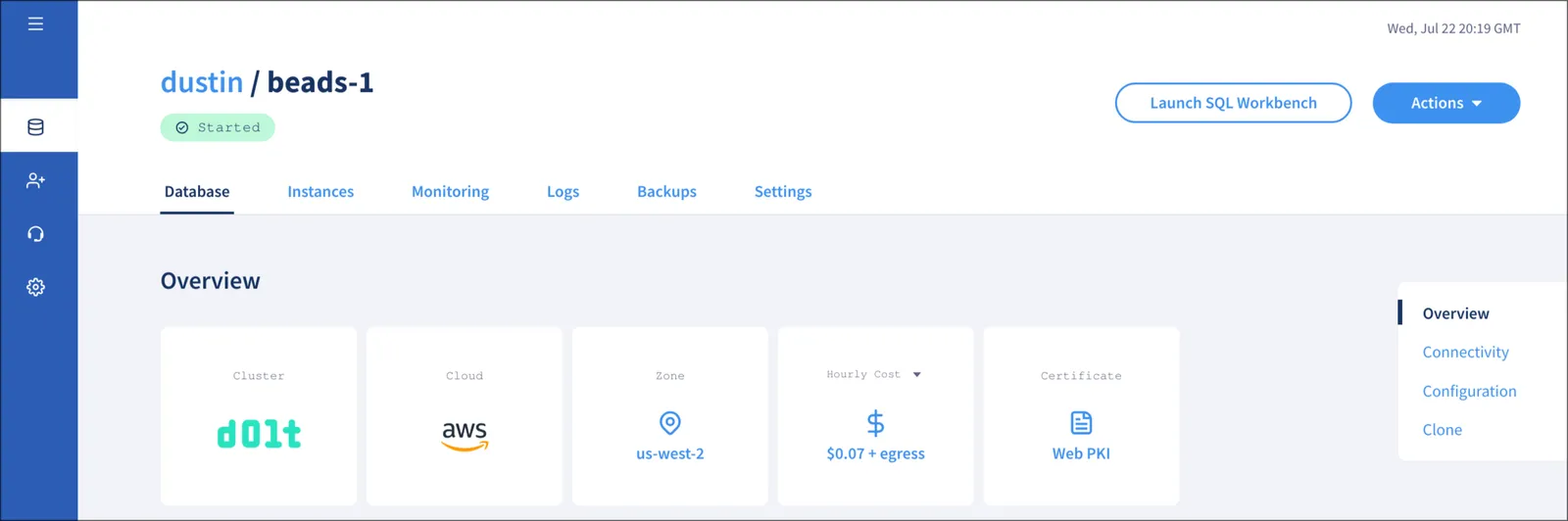
Once my hosted instance is live, I can supply the connectivity arguments to Beads which will configure my repository to use this instance.
➜  remote_bd_1 git:(main) ✗ export BEADS_PROXIED_SERVER_EXTERNAL_PASSWORD=password
➜  remote_bd_1 git:(main) ✗ bd init \
    --proxied-server \
    --proxied-server-external-host veganmessiah-beads-1.dbs.hosted.doltdb.com \
    --proxied-server-external-port 3306 \
    --proxied-server-external-user root \
    --database beads_1 \
    --proxied-server-external-tls
migrating schema: 0001_create_issues.up.sql
...
✓ bd initialized successfully!

  Backend: dolt
  Mode: proxied-server
  Database: beads_1
  Issue prefix: remote_bd_1
  Issues will be named: remote_bd_1-<hash> (e.g., remote_bd_1-a3f2dd)

Run bd quickstart to get started.
➜  remote_bd_1 git:(main) bd list
No issues found.
➜  remote_bd_1 git:(main) bd create "example issue 1 remote bd 1" -d "this is an example in a hosted dolt instance" -p2
✓ Created issue: remote_bd_1-yzb — example issue 1 remote bd 1
  Priority: P2
  Status: open
➜  remote_bd_1 git:(main) bd list
○ remote_bd_1-yzb ● P2 example issue 1 remote bd 1

--------------------------------------------------------------------------------
Total: 1 issues (1 open, 0 in progress)

Status: ○ open  ◐ in_progress  ● blocked  ✓ closed  ❄ deferred
And I can see my new bead on the Hosted Dolt Workbench as well.
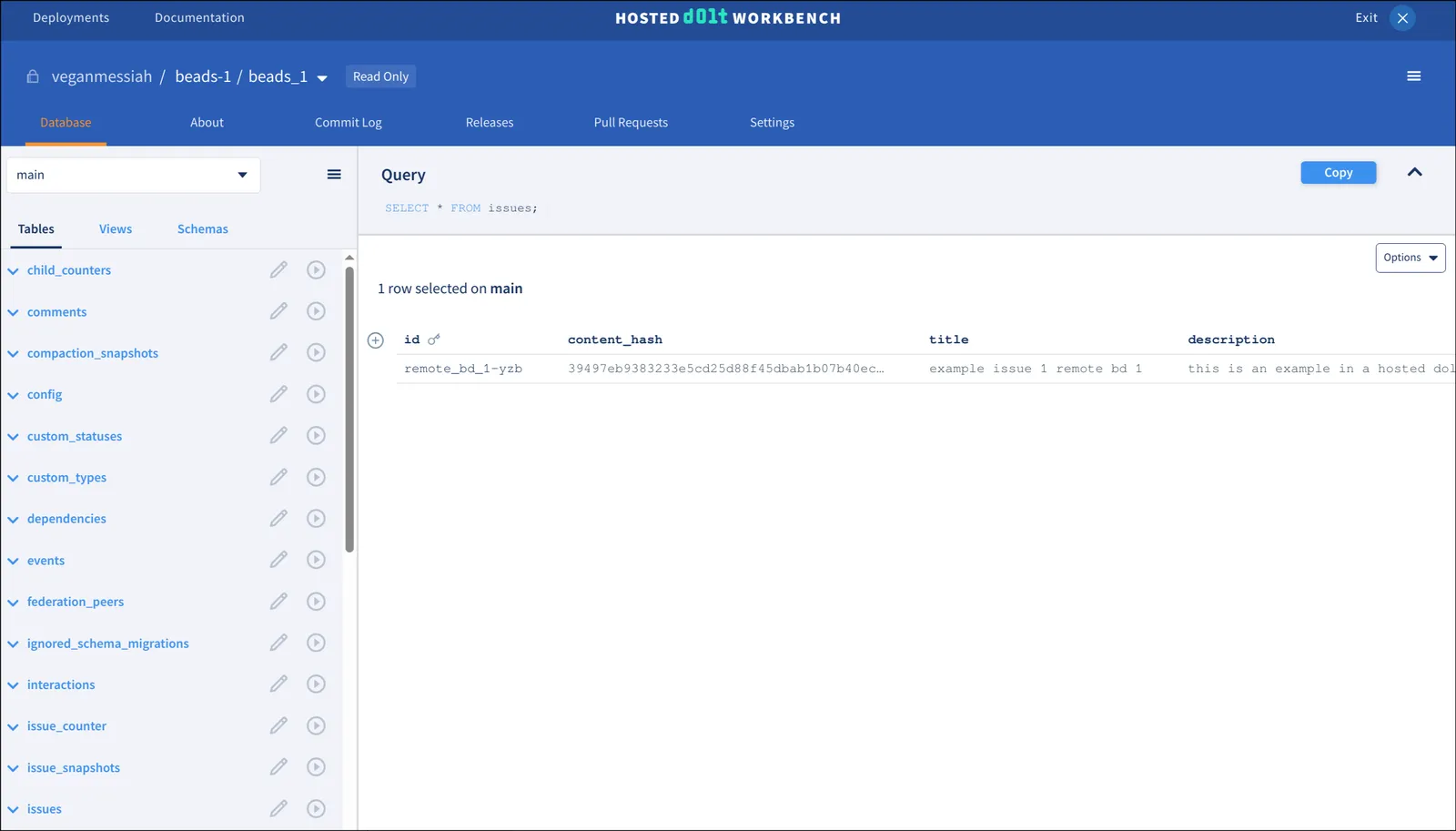
Now on a different host with Beads installed I can have a Beads repository use this same server and database, which will share beads across them. I just need to supply the same credentials for accessing the server.
ubuntu@ip-10-2-0-210:~/remote_bd_2$ export BEADS_PROXIED_SERVER_EXTERNAL_PASSWORD=password
ubuntu@ip-10-2-0-210:~/remote_bd_2$ bd init \
    --proxied-server \
    --proxied-server-external-host veganmessiah-beads-1.dbs.hosted.doltdb.com \
    --proxied-server-external-port 3306 \
    --proxied-server-external-user root \
    --database beads_1 \
    --proxied-server-external-tls
...
✓ bd initialized successfully!

  Backend: dolt
  Mode: proxied-server
  Database: beads_1
  Issue prefix: remote_bd_2
  Issues will be named: remote_bd_2-<hash> (e.g., remote_bd_2-a3f2dd)

Run bd quickstart to get started.

ubuntu@ip-10-2-0-210:~/remote_bd_2$ bd list
○ remote_bd_1-yzb ● P2 example issue 1 remote bd 1

--------------------------------------------------------------------------------
Total: 1 issues (1 open, 0 in progress)

Status: ○ open  ◐ in_progress  ● blocked  ✓ closed  ❄ deferred
ubuntu@ip-10-2-0-210:~/remote_bd_2$ bd create "example issue 2 remote bd 2" -d "a different bead made on a different host" -p1
✓ Created issue: remote_bd_2-d8w — example issue 2 remote bd 2
  Priority: P1
  Status: open
ubuntu@ip-10-2-0-210:~/remote_bd_2$ bd list
○ remote_bd_2-d8w ● P1 example issue 2 remote bd 2
○ remote_bd_1-yzb ● P2 example issue 1 remote bd 1

--------------------------------------------------------------------------------
Total: 2 issues (2 open, 0 in progress)

Status: ○ open  ◐ in_progress  ● blocked  ✓ closed  ❄ deferred
And as you can see from the output above, my beads are shared. I can also view them in the Hosted Dolt Workbench.
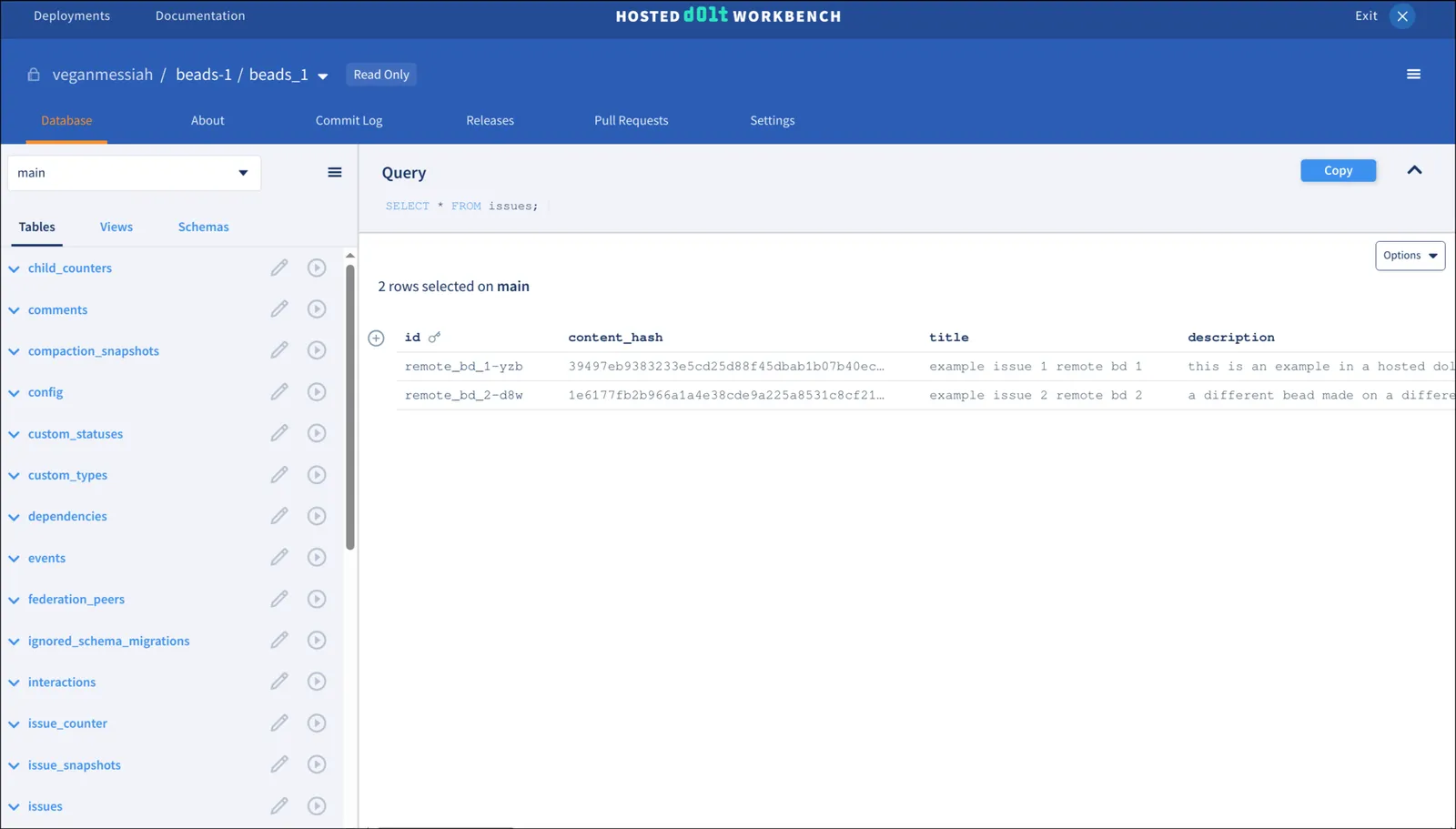
As I mentioned, many folks have been asking for such a Beads option and proxied-server mode is what makes it available today.
Please note though that this is the most basic form of a centralized Beads server, and has no authentication or identity management aside from SQL identities and permissions configured in the Dolt database itself.
Gastownhall is in the process of developing an enterprise-grade team server, and is currently taking sign-ups for interested parties.
Conclusion#
I hope this preview of proxied-server mode in Beads excites you and encourages you to try it, it’s an excellent tool for coding agents and agent orchestrators alike.
If you’re interested in using Beads for a team or enterprise use-case, but need a production/enterprise-grade deployment, please reach out to Chris Sells in the Gastownhall Discord who is currently onboarding customers for this product while it is still in development.
And feel free to come by Discord and let us know if you have any questions about Beads or Dolt, we’re happy to chat!