

DumboDB is a version-controlled document database. Similar to how Dolt is like if MySQL and Git had a baby, Dumbo is the result of combining MongoDB and Git. As such, it has a commit history that can be traversed and queried.
A couple weeks ago, I wrote about new filtering features in the dumboLog operation. There was a lot to cover there, so I kind of brushed over the new pagination feature which had been added at the same time. Today, we are going to take a closer look!
Pagination - A Review#
Pagination of results from databases is a common requirement. When you have a large result set, you don’t want to return all of the results at once. Instead, you want to return a subset of the results and allow the client to request additional pages of results as needed.
The common pattern for pagination of results from databases looks something like this:
- Have a general query which filters for the results you want.
- State the number of results you want to retrieve.
- State the number of results you want to skip.
In SQL, the LIMIT and OFFSET keywords are used to accomplish this. For example:
SELECT product_id, product_name, price
FROM products
ORDER BY product_id ASC
LIMIT 10                     -- Get 10 results per page.
OFFSET 20;                   -- Skip the first 20 results (page 3).
When you get back results of less than 20 rows, you know you’ve reached the end of that total result set.
Similarly in MongoDB, the limit and skip keywords are used to accomplish this. For example:
db.products.find()
   .sort({ product_id: 1 })
   .skip(20)                 // Skip the first 20 results (page 3)
   .limit(10);               // Get 10 results per page.
Both of these approaches may be optimizable based on what you are querying and what indexes you have in play. They do run the risk of being slow if the query planner can’t quickly skip the number of records requested though. The alternative is to use a keyset pagination approach, which is generally more performant. In that case, your query is updated to ensure that you are looking for records which are greater than your previous page’s last record.
For example, if you are paginating through products by product_id, and product_id is a unique key, you can do something like this:
-- Fetch Page 1
SELECT product_id, product_name, price
FROM products
ORDER BY product_id ASC
LIMIT 10;
In your application code, the last record received from the first query has a product_id of 42. You can then use that value to fetch the next page of results:
-- Fetch Page 2
SELECT product_id, product_name, price
FROM products
WHERE product_id > 42  -- Seek directly past the last item
ORDER BY product_id ASC
LIMIT 10;
You would continue this process until you receive a result set of less than 10 rows, at which point you know you’ve reached the end of the result set.
In MongoDB, you can do something similar:
// Fetch Page 1
const page1 = await db.products.find({})
   .sort({ _id: 1 })
   .limit(10)
   .toArray();
Again in your application code, using the _id from the last record, you can request the next page of results:
// Fetch Page 2
const page2 = await db.products.find({
      _id: { $gt: ObjectId("60c72b2f9b1d8b2bad123456") } // Seek directly past the last items
   })
   .sort({ _id: 1 })
   .limit(10)
   .toArray();
Thanks to the fact that the product_id and _id fields are ordered and implicitly indexed, this approach is generally more performant than using OFFSET or skip.
There is even a third approach, which is to use a cursor to keep track of your position in the result set. In SQL this is a little involved because you need to declare the cursor on the server, but in MongoDB it is a little more straightforward because the complexity is handled by the client side driver. Unfortunately, DumboDB can not support cursors because all version control operations are performed via runCommand, and the results returned do not support cursors. So, for the purposes of this post, we will just leave it at that.
Why Those Pagination Approaches Won’t Work for DumboDB Commit Logs#
In the cases above, the key ingredient is the ability to order the full result set in advance, then jump to subsets of that result set. In the case of DumboDB, the commit history is not ordered in a way that allows for this. Commit IDs themselves are unsortable by the nature of them being cryptographic checksums.
At the heart of the issue is that the commit history is a directed acyclic graph (DAG). This means that there is no single linear ordering of commits and therefore no way to “jump” to a specific commit in the history. Instead, you must traverse the graph in order to retrieve the commits in the correct order.
Let’s consider an example commit history:
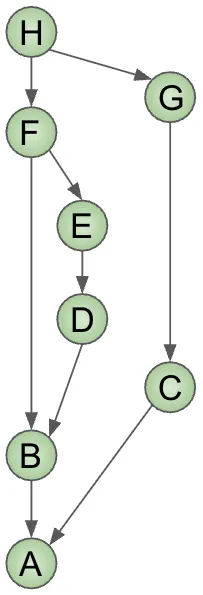
In this history, the first commit is A, and there are two branches, one leading to commit B and the other leading to commit C. This progresses until H, which is the most recent commit. It is a merge commit which has F and G as its parents. Using the DAG alone, how we log the history is somewhat arbitrary. If we logged from H, we could log F second, or we could log G second. The graph structure does not dictate the order of traversal, and therefore the order of commits in the log.
To lock this down a little bit, in Dolt we store two additional pieces of data in each commit: height and time. The height increases by 1 for each serial commit, and for merge commits, the height is the maximum of the heights of its two parents, plus one. To illustrate this, let’s add the height and time to our example commit history. The height is indicated with the small red numbers, and the time goes up with the arrow:
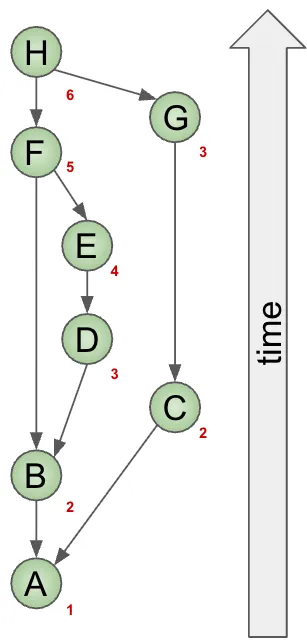
DumboDB, and Dolt for that matter, log commits in order of height and then by time. So if we look at the entire history for this commit DAG, it would be logged in the following order:
H, F, E, G, D, C, B, AThe reason the limit and skip approach won’t work is because we would need to re-walk the entire commit history from H for every page. So as the history gets longer, this becomes work that is repeated for every page and therefore not performant. This results from the fact that we need to perform a breadth-first search to traverse the graph. With each step of walking the graph, we discover the parents of that specific commit. These commits which have been discovered, but not logged, are called the “frontier” of the search. The frontier is the set of commits which are candidates for logging next, and every one of them was reached by walking the graph from another commit.
Looking at all of the commits in the frontier, we compare their heights and timestamps to determine which commit to log next. This is repeated until we have logged the entire history.
To give a concrete example, say we want to get this full history, but we want to paginate it with 3 commits per page. The first page would be:
H, F, EAt which point there are three discovered commits, G, D and B. The next page will start with a commit from that set, because by the BFS algorithm, that’s all that exists to consider logging at all. This means that for the second page of results, we need to do all of the work we did for the first page. That set of frontier commits is necessary to determine the next commit to log and therefore must be re-calculated. So, assuming you do that work, the second page would be:
G, D, CAnd the frontier of discovered commits would be B and A. If a client comes around and requests the third page using just limit and skip, we would need to do the first AND second page’s work again to determine the next commit to log. This is not performant, and so we need to do something different.
Introducing the next Parameter#
As you may have picked up, the frontier is important. It would be nice if we didn’t need to re-calculate the frontier for every page. This is where dumboLog’s next parameter comes in. The next parameter is a list of commit IDs which represent the frontier of the search after the last page was logged. This allows us to skip all of the work we did to get to that point and just continue logging from there.
Here is a pseudo-code demonstration of the example above. We’ll use real code below, but I want to keep it simple using the same identifiers as the example above. The first page of results would be retrieved like this:
db.runCommand({
   dumboLog: 1,
   all: 1
   limit: 3
});
Which will return the following results:
{
   "commits": ["H", "F", "E"],
   "next": ["G", "D", "B"]
}
Then using the next parameter, we can retrieve the second page of results as the from parameter:
db.runCommand({
   dumboLog: 1,
   from: ["G", "D", "B"]
   limit: 3,
});
Returns:
{
   "commits": ["G", "D", "C"],
   "next": ["B", "A"]
}
For the third page, we again use the previously returned next parameter and pass it as the from parameter:
db.runCommand({
   dumboLog: 1,
   from: ["B", "A"]
   limit: 3,
});
Will return:
{
   "commits": ["B", "A"]
}
Since there is no next parameter returned, we know that we have reached the end of the commit history, using page limits of 3 commits per page.
It’s important to point out that the B commit existed in the frontier commits both after the first page and after the second page. This is a subtle point. The fact of the matter is that you could have dozens of commits in the frontier, and it may take a while before you actually log some of them. Since some branches can run for a long time and can have many commits, and other branches may just be a single commit, there isn’t really a general way to reduce the size of the frontier set without losing commits. The next field is the solution to avoid repeating work. The client should ignore its contents and just feed it back into the next dumboLog command with the from parameter.
Example Code#
A general approach to paginating all results from dumboLog is to use a loop which continues until there are no more next values returned.
  function paginateAllBranches(pageSize) {
    let from = undefined, page = 0;
    do {
      const cmd = from
        ? { dumboLog: 1, limit: pageSize, from }
        : { dumboLog: 1, limit: pageSize, all: true }; // Alternatively, you could seed `from` with the branches you care about.

      // Run the command to get the next page of results.
      const res = db.runCommand(cmd);

      print(`--- page ${++page} ---`);
      res.commits.forEach(c => print(`  ${c.commitId.slice(0, 12)}  ${c.message}`));

      // Set the `from` parameter to the `next` value returned from the command.
      // This carries the frontier commits forward to the next BFS iteration (page).
      from = res.next;
    } while (from);
  }
Running this function with a pageSize of 3 will produce the following output:
mydb> paginateAllBranches(3)
--- page 1 ---
  863ci6dtesqj  merge G to main (H)
  egsple30h94e  merge E to main (F)
  f5h97b98o0cr  E
--- page 2 ---
  rjoig95hlqd1  G
  0fo1apcoq9ia  D
  hfu6dqfskdom  C
--- page 3 ---
  588rp127tt01  B
  nm90t0g3i75i  A
  tk2hgiilc1ln  Initialize database
With larger commit histories, you would use much larger page sizes obviously. Also, you can add additional filtering parameters to the command to limit the results to a specific set of documents or $match criteria. Read our previous post on DumboDB Log Filters for more information on that.
Gotcha#
One thing to be aware of is that the limit parameter is 20 by default. If you don’t look for the next parameter, you may prematurely think you’ve reached the end of the commit history. Always check for the next returned field to determine if there are more commits to inspect.
What’s Next?#
Now that we have decent indexes and the ability to modify and inspect the commit history, I’m working on unDrop support for DumboDB. This is very similar to the Dolt unDrop feature and will allow you to recover dropped databases.
Want to learn more about Dolt and Dumbo? Hop on our Discord to ask questions and nerd out about version-controlled databases!