
Beads is a tool for extending the memory of coding agents, such as Claude Code, allowing them to manage tasks (i.e. beads) themselves. It was originally built by Steve Yegge and is now part of Gaslandia, which comprises of Beads, Gastown, Gas City, and Wasteland. Beads is backed by Dolt, and version v1.0.5 is available now.
In today’s blog, I’ll cover a common question we’ve seen from Beads users about how to evolve with the tool: “I’ve been using Beads classic and want to know how to move to server mode, when should I do that, and how do I do that?” I’ll answer this by migrating from the most simple, “classic”, single-agent mode to the server and shared-server modes that better support multi-agent workflows.
Beads Classic#
Most Beads users use the “classic” mode of Beads, which provides a coding-agent persistent memory and an interface for self-managing it. In this example, I have the latest Dolt installed, v2.0.8, and will make a new Git project where my coding agent will work.
➜  repros git:(main) dolt version
dolt version 2.0.8
➜  repros git:(main) ✗ mkdir evolving_demo
➜  repros git:(main) ✗ cd evolving_demo
➜  evolving_demo git:(main) ✗ echo "# evolving_demo" >> README.md
➜  evolving_demo git:(main) ✗ git init
Initialized empty Git repository in /home/dustin/cursor_src/repros/evolving_demo/.git/
➜  evolving_demo git:(main) ✗ git add .
➜  evolving_demo git:(main) ✗ git commit -m 'README.md'
[main (root-commit) 9dffb6e] README.md
 1 file changed, 1 insertion(+)
 create mode 100644 README.md
➜  evolving_demo git:(main) git remote add origin https://github.com/coffeegoddd/evolving_demo.git
➜  evolving_demo git:(main) git push origin main
Enumerating objects: 3, done.
Counting objects: 100% (3/3), done.
Writing objects: 100% (3/3), 250 bytes | 250.00 KiB/s, done.
Total 3 (delta 0), reused 0 (delta 0), pack-reused 0 (from 0)
To https://github.com/coffeegoddd/evolving_demo.git
 * [new branch]      main -> main
➜  evolving_demo git:(main)
I’ve initialized my git project and pushed it to GitHub as well. Next, I also have the latest version of Beads installed, and I can run bd init to initialize the project with everything my agent will need to use Beads successfully.
➜  evolving_demo git:(main) ✗ bd version
bd version 1.0.5 (dev: 801fb95d1767)
➜  evolving_demo git:(main) bd init
  ✓ Configured Dolt remote: origin → git+https://github.com/coffeegoddd/evolving_demo.git
  Repository ID: 76062c1e
  Clone ID: 642acc6d98a2785e

▶ Already configured as: maintainer
Change role? [y/N]: n

▶ Auto-export can keep .beads/issues.jsonl up to date after write commands.
  This optional JSONL export is useful for viewers (bv), interchange, and issue-level migration.
  Dolt remotes/backups handle cross-machine sync and backup.

Enable auto-export? [y/N]: n
  ✓ Auto-export disabled (enable later with: bd config set export.auto true)
  Hooks installed to: .beads/hooks/
  ✓ Created AGENTS.md with agent instructions
Installing Claude hooks for this project...
✓ Registered SessionStart hook
Installing Claude Code integration...
✓ Created new CLAUDE.md with beads integration

✓ Claude Code integration installed
  File: /home/dustin/cursor_src/repros/evolving_demo/CLAUDE.md
No additional configuration needed!

✓ Claude Code integration installed
  Settings: /home/dustin/cursor_src/repros/evolving_demo/.claude/settings.json

Restart Claude Code for changes to take effect.
Installing Beads agent skill...
✓ Beads agent skill installed
  Skill: /home/dustin/cursor_src/repros/evolving_demo/.agents/skills/beads/SKILL.md
Installing Codex native hooks for this project...
✓ Codex native hooks installed
Installing Codex instructions for this project...
✓ Codex instructions installed
  File: /home/dustin/cursor_src/repros/evolving_demo/AGENTS.md
Restart Codex if it is already running.
  ✓ Committed beads files to git

⚠ Git upstream not configured
  For sync workflows, set your upstream with:
  git remote add upstream <repo-url>


✓ bd initialized successfully!

  Backend: dolt
  Mode: embedded
  Database: evolving_demo
  Issue prefix: evolving_demo
  Issues will be named: evolving_demo-<hash> (e.g., evolving_demo-a3f2dd)

Run bd quickstart to get started.
Importantly, always choose the role ‘maintainer’ and choose ‘no’ for auto-export.
Contributor mode is outside the scope of this blog, and auto-export is a legacy feature.
After Beads is initialized in my repo, I can create a sample bead to test it out before my agent takes over.
➜  evolving_demo git:(main) bd create "my first bead" -t task -p 2
✓ Created issue: evolving_demo-0v4 — my first bead
  Priority: P2
  Status: open

💡 Tip: Install the beads plugin for automatic workflow context, or run 'bd setup claude' for CLI-only mode
➜  evolving_demo git:(main) bd list
○ evolving_demo-0v4 ● P2 my first bead

--------------------------------------------------------------------------------
Total: 1 issues (1 open, 0 in progress)

Status: ○ open  ◐ in_progress  ● blocked  ✓ closed  ❄ deferred
Next, I’ll delete this sample issue and turn things over to Claude to start working.
➜  evolving_demo git:(main) bd delete evolving_demo-0v4 --force
✓ Deleted evolving_demo-0v4
  Removed 0 dependency link(s)
  Updated text references in 0 issue(s)
Starting my agent in the repo brings it up with all the context it needs to use Beads on its own, so I can just talk to the agent normally, and it will get to work.
In this example I’ve asked it to write me a news fetching application, and when Claude starts working, I can see what it’s doing in the bd list output.
➜  evolving_demo git:(main) bd list
○ evolving_demo-2wo ● P2 Unit test RSS client with httptest fixture
○ evolving_demo-gby ● P2 Implement output formatters (text and JSON)
◐ evolving_demo-mlq ● P2 Scaffold Go module and CLI entry point
○ evolving_demo-p5d ● P2 Implement Google News RSS client
○ evolving_demo-y7r ● P2 Wire main.go: client + formatter + error handling
○ evolving_demo-6ed ● P3 Write README with build and usage instructions

--------------------------------------------------------------------------------
Total: 6 issues (5 open, 1 in progress)

Status: ○ open  ◐ in_progress  ● blocked  ✓ closed  ❄ deferred
When Claude is done, it closes the beads it worked on, and my app is ready to use. But Claude did not know that it can push the beads of this repo up to GitHub too, just like it pushes code, so I let Claude know.
● Committed as 9ed3470. Working tree clean, only the gitignored usnews binary remains untracked. All 6 beads issues closed. No
  remote to push to.

✻ Baked for 25s

❯ there is a remote, try bd dolt push

● Bash(bd dolt push)
  ⎿  Pushing to Dolt remote...
     Push complete.

● Beads pushed. Now checking the git remote.
It actually used to be the case that there was nothing visible on GitHub when using it as a Dolt remote, but we recently added some visual cues to more easily tell that your Git repo has Dolt data.
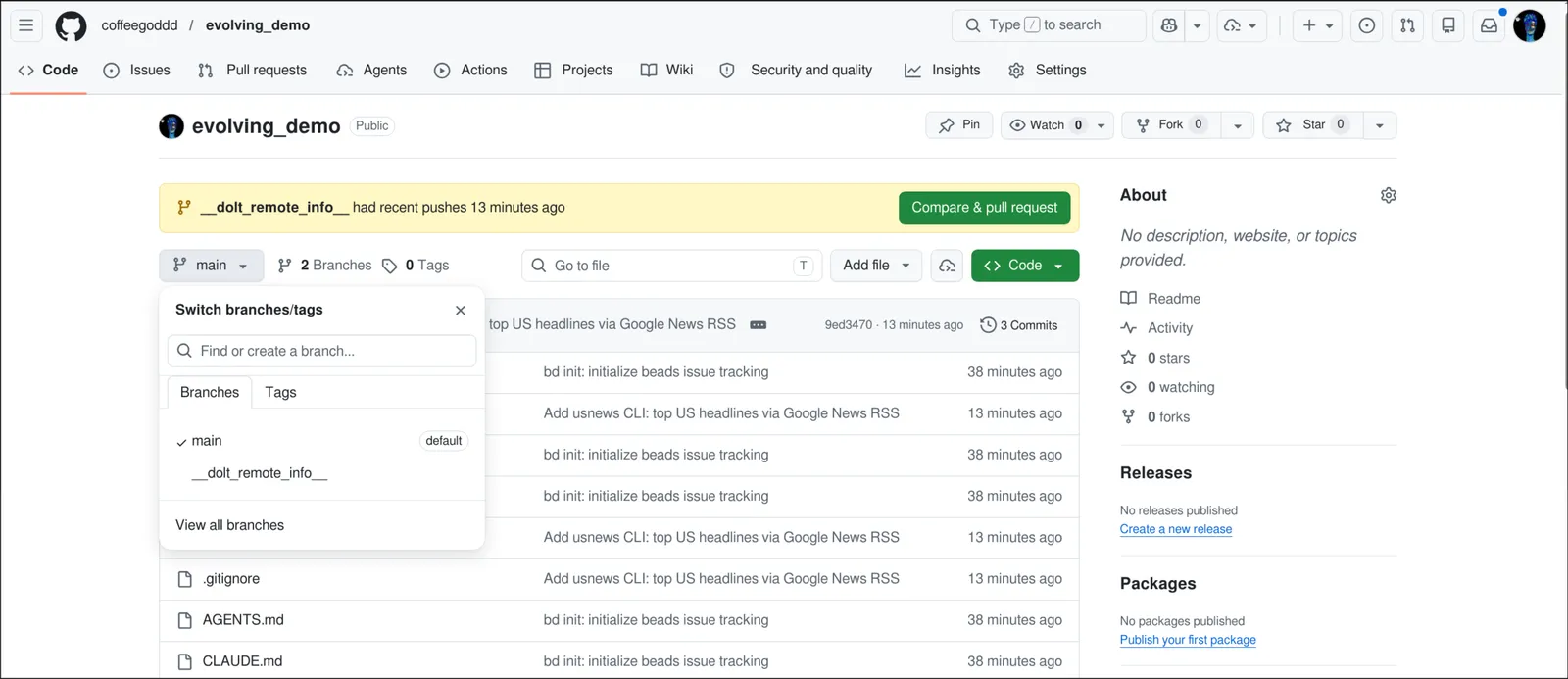
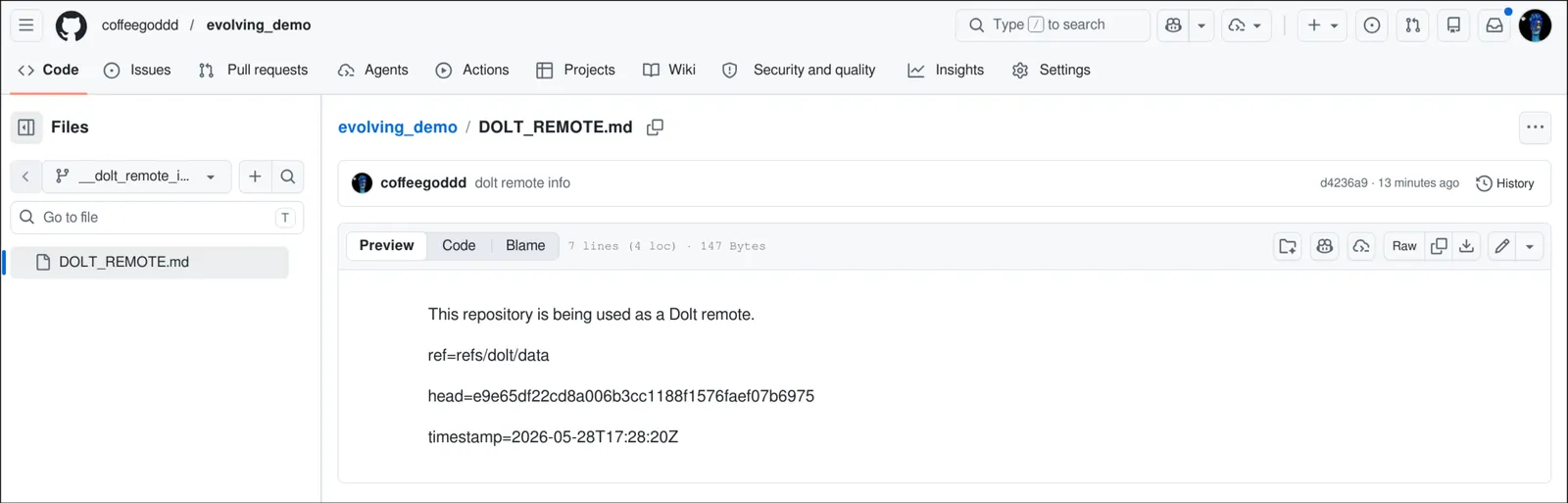
Git Dolt remotes now also create and push to a branch __dolt_remote_info__, and this branch will have a file updated on each dolt push that tells you the ref Dolt is using and its HEAD sha.
This is the standard Beads Classic usage pattern and app development style. And the application Claude wrote works great.
➜  evolving_demo git:(main) go run .
 1. U.S., Iran nearing deal to end war and reopen Strait of Hormuz — The Washington Post (1h ago)
 2. Judge halts Trump ‘anti-weaponization’ fund after Jan. 6 prosecutor sues — NBC News (1h ago)
 3. Former AG Pam Bondi testifies before Congress over handling of the Epstein files — NPR (23m ago)
 4. Romania Says It Could Invoke NATO’s Article 4. What Would That Do? — The New York Times (4h ago)
 5. Kenyan court halts US plans for Ebola quarantine facility for Americans — politico.eu (5h ago)
 6. Trump Loses It at Jill Biden in Morning Rage Post — The Daily Beast (4h ago)
 7. Bus hits cars in Virginia, killing 5 people and injuring 34, state police say — AP News (3h ago)
 8. California House Primary in Sacramento Displays Democrats’ Fierce Generational Battle — The New York Times (7h ago)
 9. Mullin plan to punish sanctuary jurisdictions by targeting their airports faces fierce headwinds — CNN (7h ago)
10. In Carroll Lawsuits Inquiry, Scrutiny Turns Toward Private Citizens Who Antagonized Trump — The New York Times (51m ago)
Server Mode#
The next phase of evolving with Beads is transitioning from classic to server mode. Server mode here means Beads will run a local Dolt server on your host, instead of using the non-server embedded Dolt mode, which is the default.
But why use server mode in the first place?
The reason users may want to consider running Beads in server mode is because it allows you to run many coding agent sessions against the same Git repo, since server mode is designed for multi-process concurrent use. This is a limitation of Beads classic, which is single-writer.
To migrate from classic mode to server mode, let’s first make a new bead that we can easily track across the migration from classic to server mode.
➜  evolving_demo git:(main) ✗ bd create "from classic to server mode" -p 2
✓ Created issue: evolving_demo-w1g — from classic to server mode
  Priority: P2
  Status: open
Then, to perform the migration we actually want to take a backup of our Beads database in classic mode, then after we initialize Beads in server mode, we’ll restore from the backup, which will give us our database back.
To do this I first make a new directory to use as my database backup, then initialize it with the bd backup init command. After initialization I can run bd backup sync to sync my database to the backup destination.
➜  evolving_demo git:(main) ✗ mkdir ../ed_backup_1
➜  evolving_demo git:(main) ✗ bd backup init ../ed_backup_1
Backup destination configured: file:///home/dustin/cursor_src/repros/ed_backup_1
Run 'bd backup sync' to push your data.
➜  evolving_demo git:(main) ✗ bd backup sync

Backup synced in 20ms
With the backup synced, I can then remove the .beads directory in my Git repo, which will delete the classic mode database (or just mv it to not be named .beads just in case), and then re-initialize Beads using the --server flag.
➜  evolving_demo git:(main) ✗ rm -rf .beads
➜  evolving_demo git:(main) ✗ bd init --server
Bootstrapped from remote: git+https://github.com/coffeegoddd/evolving_demo.git
Synced database from git+https://github.com/coffeegoddd/evolving_demo.git
  ✓ Bootstrapped from remote: git+https://github.com/coffeegoddd/evolving_demo.git
  Repository ID: 76062c1e
  Clone ID: 642acc6d98a2785e
  ✓ Adopted project identity from existing database

▶ Already configured as: maintainer
Change role? [y/N]: n

▶ Auto-export can keep .beads/issues.jsonl up to date after write commands.
  This optional JSONL export is useful for viewers (bv), interchange, and issue-level migration.
  Dolt remotes/backups handle cross-machine sync and backup.

Enable auto-export? [y/N]: n
  ✓ Auto-export disabled (enable later with: bd config set export.auto true)
  Hooks installed to: .beads/hooks/
  ✓ Updated beads section in AGENTS.md to latest format
Installing Claude hooks for this project...
✓ Hook already registered: SessionStart
Installing Claude Code integration...
✓ Updated existing beads section in CLAUDE.md

✓ Claude Code integration installed
  File: /home/dustin/cursor_src/repros/evolving_demo/CLAUDE.md
No additional configuration needed!

✓ Claude Code integration installed
  Settings: /home/dustin/cursor_src/repros/evolving_demo/.claude/settings.json

Restart Claude Code for changes to take effect.
Installing Beads agent skill...
✓ Beads agent skill installed
  Skill: /home/dustin/cursor_src/repros/evolving_demo/.agents/skills/beads/SKILL.md
Installing Codex native hooks for this project...
✓ Codex native hooks installed
Installing Codex instructions for this project...
✓ Codex instructions installed
  File: /home/dustin/cursor_src/repros/evolving_demo/AGENTS.md
Restart Codex if it is already running.
  ✓ Committed beads files to git

✓ bd initialized from git remote!

  Backend: dolt
  Mode: server
  Server: root@127.0.0.1:46091

  ⚠ Server host defaulted to 127.0.0.1.
    If your Dolt server is remote, set BEADS_DOLT_SERVER_HOST or pass --server-host.
  Database: evolving_demo
  Issue prefix: evolving_demo
  Issues will be named: evolving_demo-<hash> (e.g., evolving_demo-a3f2dd)

Run bd quickstart to get started.
As before, I keep my role as ‘maintainer’ and decline auto-export. This time though Beads is using a local server running on port 46091, as shown in the output above.
Now I can restore from the backup I made earlier to get all my beads back.
➜  evolving_demo git:(main) bd backup restore ../ed_backup_1 --force
✓ Restore complete
➜  evolving_demo git:(main) ✗ bd list
○ evolving_demo-w1g ● P2 from classic to server mode

--------------------------------------------------------------------------------
Total: 1 issues (1 open, 0 in progress)

Status: ○ open  ◐ in_progress  ● blocked  ✓ closed  ❄ deferred
And you can see that the bead I made is available and ready. I can also see the “status” of my Beads server by running bd dolt status.
➜  evolving_demo git:(main) ✗ bd dolt status
Dolt server: running
  PID:  778645
  Port: 46091
  Data: /home/dustin/cursor_src/repros/evolving_demo/.beads/dolt
  Logs: /home/dustin/cursor_src/repros/evolving_demo/.beads/dolt-server.log
➜  evolving_demo git:(main) ✗
If I wanted to actually poke around in the state of my Beads database, I could do so with a standard MySQL client. As of this blog, Beads servers always run with root and no password.
➜  evolving_demo git:(main) ✗ docker run --rm -it --network host mysql:8 mysql -h 127.0.0.1 -P 46091 -u root
Welcome to the MySQL monitor.  Commands end with ; or \g.
Your MySQL connection id is 27
Server version: 8.0.33 Dolt

Copyright (c) 2000, 2026, Oracle and/or its affiliates.

Oracle is a registered trademark of Oracle Corporation and/or its
affiliates. Other names may be trademarks of their respective
owners.

Type 'help;' or '\h' for help. Type '\c' to clear the current input statement.

mysql> show databases;
+--------------------+
| Database           |
+--------------------+
| dolt               |
| evolving_demo      |
| information_schema |
| mysql              |
+--------------------+
4 rows in set (0.00 sec)

mysql> use evolving_demo;
Reading table information for completion of table and column names
You can turn off this feature to get a quicker startup with -A

Database changed
mysql> select count(*) from issues;
+----------+
| count(*) |
+----------+
|        7 |
+----------+
1 row in set (0.00 sec)

mysql> exit
Bye
Our issue count in our restored database has our bead that we tracked across the classic to server migration and the six now closed issues used to build the news application.
From this point forward, we could continue to use Beads in single-player mode as we did with classic mode, or we could open multiple terminal sessions against this repo and dispatch agents in each in parallel (non-overlapping) feature work.
Shared-server Mode#
Lastly, let’s say I’ve been enjoying using Beads on many projects on my host, both in classic mode and server mode, but have noticed that each server mode project spins up a new Dolt sql-server process. Instead of doing this, can Beads run just a single Dolt sql-server for all my projects?
Why yes it can, and this is the motivation behind shared-server mode. In this mode, Beads will manage a single global Dolt server that can house all Beads for your Git projects on the host, and these Beads will be isolated, so Beads will not leak between projects.
To migrate from normal --server mode to --shared-server mode, we simply need to go through our backup and restore flow we did above, making sure to stop the running --server mode process before starting the new --shared-server process. If you have many --server mode Beads projects on your host, you’ll want to do this for each one.
To start, let’s remove the old bead we made and make a new one to watch across the migration.
➜  evolving_demo git:(main) bd list
○ evolving_demo-w1g ● P2 from classic to server mode

--------------------------------------------------------------------------------
Total: 1 issues (1 open, 0 in progress)

Status: ○ open  ◐ in_progress  ● blocked  ✓ closed  ❄ deferred
➜  evolving_demo git:(main) bd delete evolving_demo-w1g --force
✓ Deleted evolving_demo-w1g
  Removed 0 dependency link(s)
  Updated text references in 0 issue(s)
➜  evolving_demo git:(main) ✗ bd list
No issues found.
➜  evolving_demo git:(main) ✗ bd create "from server to shared-server" -p 2
✓ Created issue: evolving_demo-pz8 — from server to shared-server
  Priority: P2
  Status: open
➜  evolving_demo git:(main) ✗ bd list
○ evolving_demo-pz8 ● P2 from server to shared-server

--------------------------------------------------------------------------------
Total: 1 issues (1 open, 0 in progress)

Status: ○ open  ◐ in_progress  ● blocked  ✓ closed  ❄ deferred
Next, we will need a new backup directory for our existing --server mode Beads database.
➜  evolving_demo git:(main) mkdir ../ed_backup_2
➜  evolving_demo git:(main) bd backup init ../ed_backup_2
Backup destination configured: file:///home/dustin/cursor_src/repros/ed_backup_2
Run 'bd backup sync' to push your data.
➜  evolving_demo git:(main) ✗ bd backup sync
Backup synced in 50ms
Once the backup is synced I can stop the --server mode server with bd dolt stop.
➜  evolving_demo git:(main) bd dolt stop
Flushed working set for 1 database(s) before server stop
Dolt server stopped.
Then, like before, I can remove the existing .beads directory in my Git project and reinitialize Beads with the --shared-server flag.
➜  evolving_demo git:(main) ✗ rm -rf .beads
➜  evolving_demo git:(main) ✗ bd init --shared-server
  ✓ Bootstrapped from remote: git+https://github.com/coffeegoddd/evolving_demo.git
  ✓ Shared Dolt server started
  ✓ Global database beads_global available
  ✓ Global database schema initialized
  ✓ Configured Dolt remote: origin → git+https://github.com/coffeegoddd/evolving_demo.git
  Repository ID: 76062c1e
  Clone ID: 642acc6d98a2785e
  ✓ Shared server mode enabled

▶ Already configured as: maintainer
Change role? [y/N]: n

▶ Auto-export can keep .beads/issues.jsonl up to date after write commands.
  This optional JSONL export is useful for viewers (bv), interchange, and issue-level migration.
  Dolt remotes/backups handle cross-machine sync and backup.

Enable auto-export? [y/N]: n
  ✓ Auto-export disabled (enable later with: bd config set export.auto true)
  Hooks installed to: .beads/hooks/
  AGENTS.md already has current agent instructions
Installing Claude hooks for this project...
✓ Hook already registered: SessionStart
Installing Claude Code integration...
✓ Updated existing beads section in CLAUDE.md

✓ Claude Code integration installed
  File: /home/dustin/cursor_src/repros/evolving_demo/CLAUDE.md
No additional configuration needed!

✓ Claude Code integration installed
  Settings: /home/dustin/cursor_src/repros/evolving_demo/.claude/settings.json

Restart Claude Code for changes to take effect.
Installing Beads agent skill...
✓ Beads agent skill installed
  Skill: /home/dustin/cursor_src/repros/evolving_demo/.agents/skills/beads/SKILL.md
Installing Codex native hooks for this project...
✓ Codex native hooks installed
Installing Codex instructions for this project...
✓ Codex instructions installed
  File: /home/dustin/cursor_src/repros/evolving_demo/AGENTS.md
Restart Codex if it is already running.
  ✓ Committed beads files to git

✓ bd initialized from git remote!

  Backend: dolt
  Mode: server
  Server: root@127.0.0.1:3308

  ⚠ Server host defaulted to 127.0.0.1.
    If your Dolt server is remote, set BEADS_DOLT_SERVER_HOST or pass --server-host.
  Database: evolving_demo
  Issue prefix: evolving_demo
  Issues will be named: evolving_demo-<hash> (e.g., evolving_demo-a3f2dd)

Run bd quickstart to get started.
Again, the role is ‘maintainer’ and ‘auto-export’ is disabled.
Now I can restore from my --server backup.
➜  evolving_demo git:(main) bd backup restore ../ed_backup_2 --force
✓ Restore complete
➜  evolving_demo git:(main) ✗ bd list
○ evolving_demo-pz8 ● P2 from server to shared-server

--------------------------------------------------------------------------------
Total: 1 issues (1 open, 0 in progress)

Status: ○ open  ◐ in_progress  ● blocked  ✓ closed  ❄ deferred
And once I do that, I’m successfully running in Shared-server mode!
Bonus#
As I mentioned earlier, Beads are scoped to a single Git repository and single Dolt database, so there is currently no way to share beads across projects.
Except actually, there kinda is… As a maintainer of Beads I snuck in a unique feature to Beads Shared-server mode which seemed like it needed, but didn’t have a way to share beads across projects.
In Shared-server mode there is a unique global beads database that works like a normal Beads database, except it is readable and writeable by all clients of the Shared server. This database is not tied to any specific Git project, so it does not have the same restrictions as ones that are tied to a specific Git project.
For this reason, if you did need to share beads between projects, you can do so by reading and writing beads with the --global flag, which will route the bd command to the global database instead of the project scoped one.
Here’s an example. First let’s delete the old migration bead we made.
➜  evolving_demo git:(main) ✗ bd delete evolving_demo-pz8 --force
✓ Deleted evolving_demo-pz8
  Removed 0 dependency link(s)
  Updated text references in 0 issue(s)
Then, we’ll make another Beads project on our host and register it on the shared server by initializing Beads with --shared-server.
➜  evolving_demo git:(main) bd list
No issues found.
➜  evolving_demo git:(main) cd ..
➜  repros git:(main) ✗ mkdir different_project
➜  repros git:(main) ✗ cd different_project
➜  different_project git:(main) ✗ git init
Initialized empty Git repository in /home/dustin/cursor_src/repros/different_project/.git/
➜  different_project git:(main) echo "# different project" >> README.md
➜  different_project git:(main) ✗ git add .
➜  different_project git:(main) ✗ git commit -m 'README.md'
[main (root-commit) a11c0f1] README.md
 1 file changed, 1 insertion(+)
 create mode 100644 README.md
➜  different_project git:(main) bd init --shared-server
  ✓ Global database beads_global available
  ✓ Global database schema initialized
  Repository ID: ad3c7c9e
  Clone ID: d9436fdceeb5a843
  ✓ Shared server mode enabled

▶ Already configured as: maintainer
Change role? [y/N]: n

▶ Auto-export can keep .beads/issues.jsonl up to date after write commands.
  This optional JSONL export is useful for viewers (bv), interchange, and issue-level migration.
  Dolt remotes/backups handle cross-machine sync and backup.

Enable auto-export? [y/N]: n
  ✓ Auto-export disabled (enable later with: bd config set export.auto true)
  Hooks installed to: .beads/hooks/
  ✓ Created AGENTS.md with agent instructions
Installing Claude hooks for this project...
✓ Registered SessionStart hook
Installing Claude Code integration...
✓ Created new CLAUDE.md with beads integration

✓ Claude Code integration installed
  File: /home/dustin/cursor_src/repros/different_project/CLAUDE.md
No additional configuration needed!

✓ Claude Code integration installed
  Settings: /home/dustin/cursor_src/repros/different_project/.claude/settings.json

Restart Claude Code for changes to take effect.
Installing Beads agent skill...
✓ Beads agent skill installed
  Skill: /home/dustin/cursor_src/repros/different_project/.agents/skills/beads/SKILL.md
Installing Codex native hooks for this project...
✓ Codex native hooks installed
Installing Codex instructions for this project...
✓ Codex instructions installed
  File: /home/dustin/cursor_src/repros/different_project/AGENTS.md
Restart Codex if it is already running.
  ✓ Committed beads files to git

⚠ No Dolt remote configured
  Issues are stored in local Dolt. .beads/issues.jsonl is an export,
  not cross-machine sync or the source of truth.
  To enable durable sync, add a git origin and then run:
    bd dolt push

✓ bd initialized successfully!

  Backend: dolt
  Mode: server
  Server: root@127.0.0.1:3308

  ⚠ Server host defaulted to 127.0.0.1.
    If your Dolt server is remote, set BEADS_DOLT_SERVER_HOST or pass --server-host.
  Database: different_project
  Issue prefix: different_project
  Issues will be named: different_project-<hash> (e.g., different_project-a3f2dd)

Run bd quickstart to get started.
Then, we can use the project as normal, and beads will route to their project scoped database.
➜  different_project git:(main) bd list
No issues found.
➜  different_project git:(main) bd create "my first different project bead" -p 2
✓ Created issue: different_project-s9i — my first different project bead
  Priority: P2
  Status: open

💡 Tip: Install the beads plugin for automatic workflow context, or run 'bd setup claude' for CLI-only mode
➜  different_project git:(main) bd list
○ different_project-s9i ● P2 my first different project bead

--------------------------------------------------------------------------------
Total: 1 issues (1 open, 0 in progress)

Status: ○ open  ◐ in_progress  ● blocked  ✓ closed  ❄ deferred
If we return to our earlier project which also uses this shared-server, you’ll see that it won’t be able to see the bead created and scoped to different_project.
➜  different_project git:(main) cd ../evolving_demo
➜  evolving_demo git:(main) bd list
No issues found.
Buuuuuuuut, if we go back to different_project and create a bead using --global, we’ll create a global bead that all shared-server projects can access.
➜  evolving_demo git:(main) cd ../different_project
➜  different_project git:(main) bd create --global "my first global bead" -p 2
✓ Created issue: global-wqk — my first global bead
  Priority: P2
  Status: open
Notice the different output of bd list with and without the --global flag.
➜  different_project git:(main) bd list
○ different_project-s9i ● P2 my first different project bead

--------------------------------------------------------------------------------
Total: 1 issues (1 open, 0 in progress)

Status: ○ open  ◐ in_progress  ● blocked  ✓ closed  ❄ deferred
➜  different_project git:(main) bd list --global
○ global-wqk ● P2 my first global bead

--------------------------------------------------------------------------------
Total: 1 issues (1 open, 0 in progress)

Status: ○ open  ◐ in_progress  ● blocked  ✓ closed  ❄ deferred
And similarly, if we return to the previous project we see the scoped beads
versus the global ones, by using the --global flag.
➜  different_project git:(main) cd ../evolving_demo
➜  evolving_demo git:(main) bd list
No issues found.
➜  evolving_demo git:(main) bd list --global
○ global-wqk ● P2 my first global bead

--------------------------------------------------------------------------------
Total: 1 issues (1 open, 0 in progress)

Status: ○ open ◐ in_progress ● blocked ✓ closed ❄ deferredConclusion#
I hope this helps clarify some common usage patterns for Beads, and we encourage you to give it a try if you haven’t already.
Also, feel free to join both the Gaslandia Discord and the Dolt Discord if you haven’t already. We’d love to chat with you and discuss building for the agentic future.