
Hosted Dolt is a fully managed Dolt deployment available on AWS, GCP, and, most recently, Azure. The initial offering of Hosted Dolt on Azure only supported publicly accessible deployments. Today we are excited to announce the same level of private networking support for Azure that we already have for AWS and GCP.
What is Azure Private Link?#
Azure Private Link is a service that allows you to access VNets in other Azure subscriptions and tenants securely through Azure’s network. This means that you can create a Hosted Dolt deployment on Azure that is only accessible to your private Azure infrastructure, and not accessible over the public internet.
Creating a Deployment with Azure Private Link#
The first thing you will need to do is get the subscription ID of the Azure subscription that you want to use for your private network (You can find this in the Azure portal). Once you have the subscription ID, create a new Hosted Dolt deployment on Azure and enable the “Private deployment” option on the “Advanced” tab of the deployment creation form. Then in the “Allowed subscription IDs” box enter the subscription ID(s) that you want to allow access to your deployment.
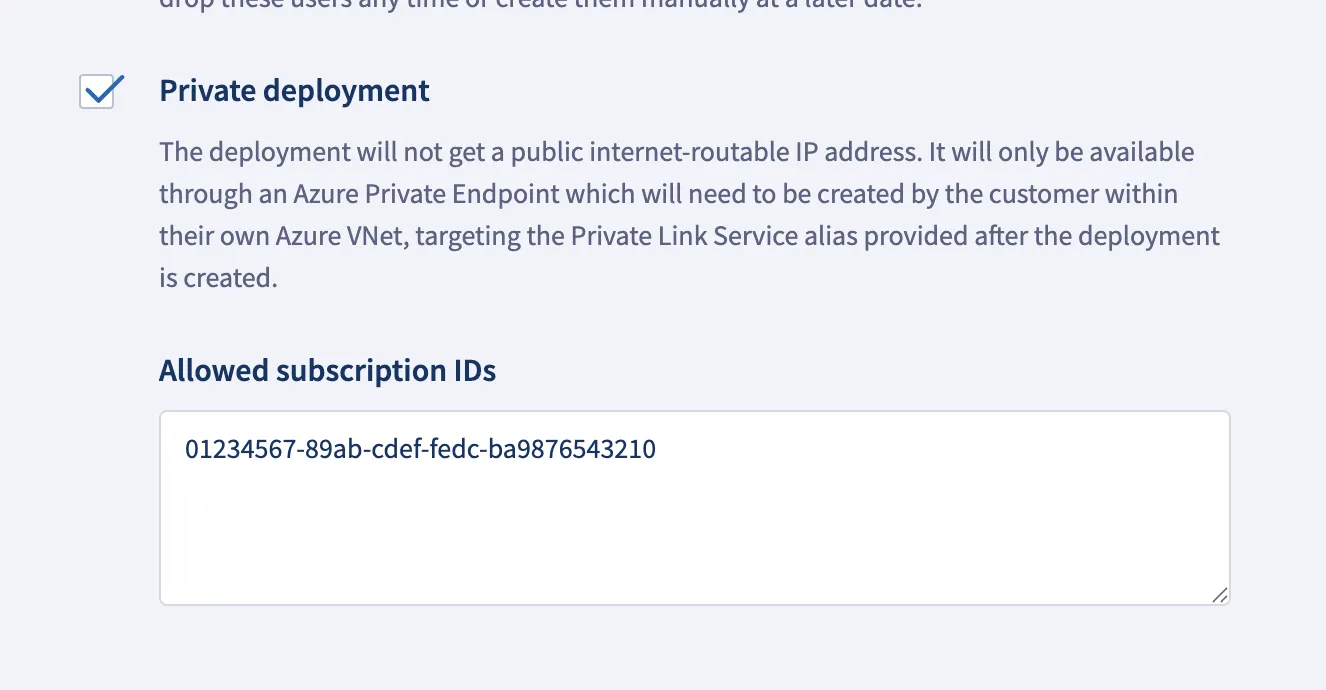
Once you have that filled out, click “Next” and review your deployment choices. Finally, click “Create Deployment” and your instance will be up and running in minutes. Once your deployment is running, you will see the connections tab populated.
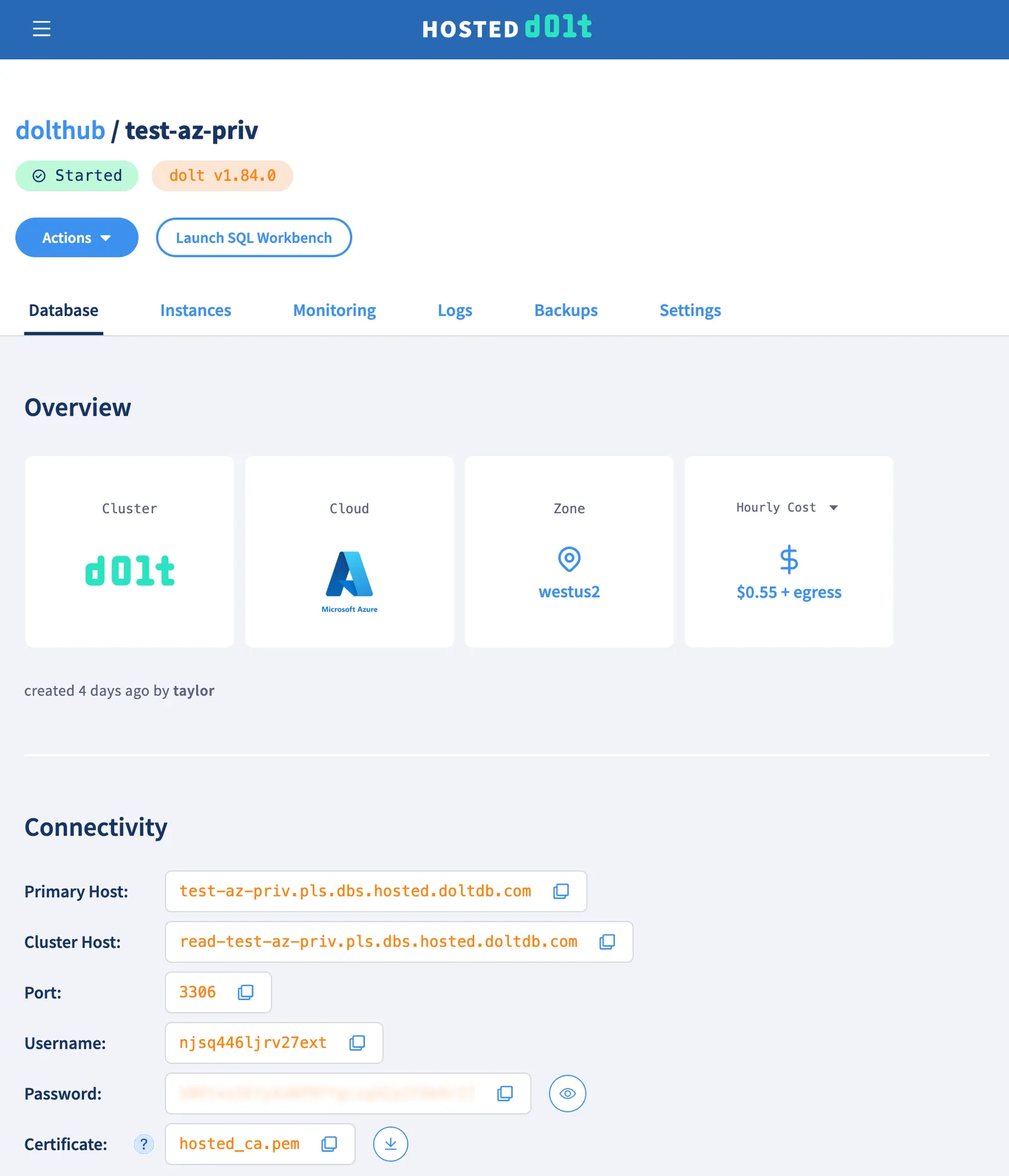
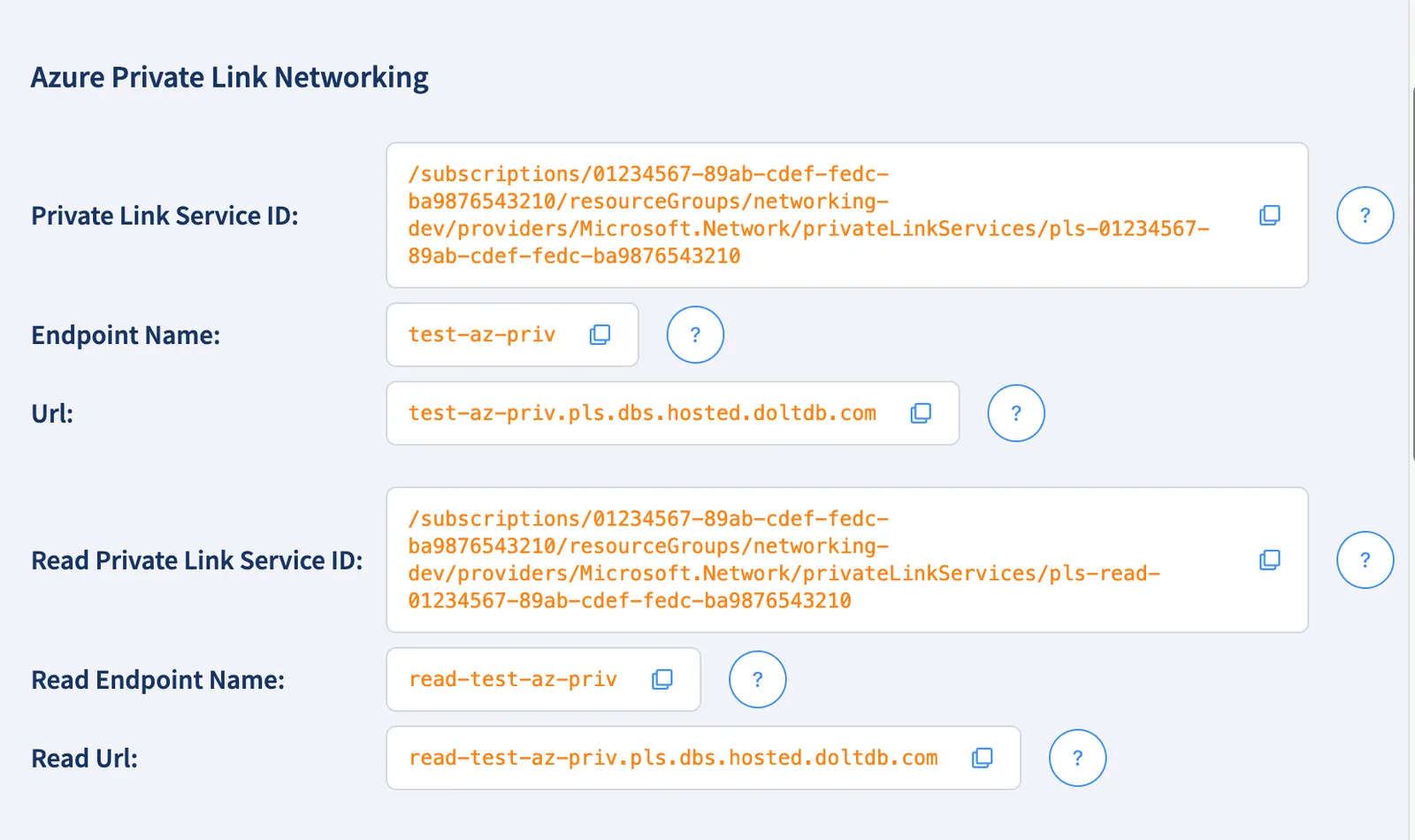
And the “Azure Private Link Networking” section of the connections tab will show you the information you will need to connect your private Azure infrastructure to your Hosted Dolt deployment.
Connecting to your Private Deployment#
By taking the information from the “Azure Private Link Networking” section of the connections tab, you can connect your private Azure infrastructure using the web portal, Azure CLI, or you could use Terraform. I won’t go through the web portal, but I will cover the Azure CLI and Terraform options.
Connecting your Infrastructure with the Azure CLI#
In order to connect your infrastructure you will need the region, resource group, virtual network, and subnet of the private network that you want to connect to your deployment.
RESOURCE_GROUP="my-resource-group"
REGION="eastus2"
VNET="my-vnet"
SUBNET="my-subnet"
then we will take the information from the “Azure Private Link Networking” section of the connections tab
PRIVATE_LINK_SERVICE_ID="/subscriptions/01234567-89ab-cdef-fedc-ba9876543210/resourceGroups/networking-dev/providers/Microsoft.Network/privateLinkServices/pls-01234567-89ab-cdef-fedc-ba9876543210"
ENDPOINT_NAME="test-az-priv"
URL="test-az-priv.pls.dbs.hosted.doltdb.com"
With that information you need to create an Azure “Private Endpoint” and then set up DNS resolution for the private endpoint so that you can connect to your deployment using the url provided in the “Azure Private Link Networking” section of the connections tab.
# Create primary
az network private-endpoint create \
    --resource-group "$RESOURCE_GROUP" \
    --name "dolt-${ENDPOINT_NAME}-private-endpoint" \
    --location "$REGION" \
    --vnet-name "$VNET" \
    --subnet "$SUBNET" \
    --private-connection-resource-id "$PRIVATE_LINK_SERVICE_ID" \
    --connection-name "dolt-${ENDPOINT_NAME}-connection"

# Retrieve private IP from the endpoint NIC
PE_NIC_ID=$(az network private-endpoint show \
    --resource-group "$RESOURCE_GROUP" \
    --name "dolt-${ENDPOINT_NAME}-private-endpoint" \
    --query "networkInterfaces[0].id" -o tsv)
PE_IP=$(az network nic show --ids "$PE_NIC_ID" \
    --query "ipConfigurations[0].privateIPAddress" -o tsv)

# Create DNS zone and VNet link
 az network private-dns zone create \
    --resource-group "$RESOURCE_GROUP" \
    --name "pls.dbs.hosted.doltdb.com"

az network private-dns link vnet create \
    --resource-group "$RESOURCE_GROUP" \
    --zone-name "pls.dbs.hosted.doltdb.com" \
    --name "dolt-${ENDPOINT_NAME}-vnet-link" \
    --virtual-network "$VNET" \
    --registration-enabled false

# Register primary DNS
az network private-dns record-set a add-record \
    --resource-group "$RESOURCE_GROUP" \
    --zone-name "pls.dbs.hosted.doltdb.com" \
    --record-set-name "$ENDPOINT_NAME" \
    --ipv4-address "$PE_IP"
Now you should be able to connect to your deployment from your instances within the given VNet using the provided URL. If you SSH onto one of your instances with the MySQL client installed, you can connect to your deployment using the MySQL command provided on the “Connections” tab of your deployment.
The process for connecting a read endpoint is very similar if you are using replication.
READ_PRIVATE_LINK_SERVICE_ID="/subscriptions/01234567-89ab-cdef-fedc-ba9876543210/resourceGroups/networking-dev/providers/Microsoft.Network/privateLinkServices/pls-read-01234567-89ab-cdef-fedc-ba9876543210"
READ_ENDPOINT_NAME="read-test-az-priv"
READ_URL="read-test-az-priv.pls.dbs.hosted.doltdb.com"

az network private-endpoint create \
    --resource-group "$RESOURCE_GROUP" \
    --name "dolt-${READ_ENDPOINT_NAME}-private-endpoint" \
    --location "$REGION" \
    --vnet-name "$VNET" \
    --subnet "$SUBNET" \
    --private-connection-resource-id "$READ_PRIVATE_LINK_SERVICE_ID" \
    --connection-name "dolt-${READ_ENDPOINT_NAME}-connection"

READ_PE_NIC_ID=$(az network private-endpoint show \
    --resource-group "$RESOURCE_GROUP" \
    --name "dolt-${READ_ENDPOINT_NAME}-private-endpoint" \
    --query "networkInterfaces[0].id" -o tsv)
READ_PE_IP=$(az network nic show --ids "$READ_PE_NIC_ID" \
    --query "ipConfigurations[0].privateIPAddress" -o tsv)

az network private-dns record-set a add-record \
    --resource-group "$RESOURCE_GROUP" \
    --zone-name "pls.dbs.hosted.doltdb.com" \
    --record-set-name "${READ_ENDPOINT_NAME}" \
--ipv4-address "$READ_PE_IP"Terraform#
The same thing can be accomplished with Terraform. Here is an example Terraform configuration that will create a private endpoint and set up DNS resolution for that endpoint. The “Variables” section of the configuration should be filled out with the appropriate values for your deployment and private network. Many of these values may come from the output of other Terraform configurations that manage your Azure infrastructure, or you could just fill them out manually.
terraform {
  required_providers {
    azurerm = {
      source  = "hashicorp/azurerm"
      version = "~> 3.0"
    }
  }
}

provider "azurerm" {
  features {}
}

# ---------------------------------------------------------------------------
# Variables
# ---------------------------------------------------------------------------

variable "resource_group" {
  type        = string
  description = "Azure resource group to create the private endpoints in"
}

variable "region" {
  type        = string
  description = "Azure region (e.g. eastus)"
}

variable "vnet" {
  type        = string
  description = "Name of the VNet to attach the private endpoints to"
}

variable "subnet" {
  type        = string
  description = "Name of the subnet within the VNet for the private endpoints"
}

variable "endpoint_name" {
  type        = string
  description = "Hosted Dolt endpoint name (used to name Azure resources and DNS records)"
}

variable "read_endpoint_name" {
  type        = string
  description = "Hosted Dolt read endpoint name (used to name Azure resources and DNS records)"
}

variable "private_link_service_id" {
  type        = string
  description = "Resource ID of the primary Private Link Service"
}

variable "read_private_link_service_id" {
  type        = string
  description = "Resource ID of the read-replica Private Link Service"
}

# ---------------------------------------------------------------------------
# Data sources
# ---------------------------------------------------------------------------

data "azurerm_subnet" "endpoint_subnet" {
  name                 = var.subnet
  virtual_network_name = var.vnet
  resource_group_name  = var.resource_group
}

# ---------------------------------------------------------------------------
# Private endpoints
# ---------------------------------------------------------------------------

resource "azurerm_private_endpoint" "primary" {
  name                = "dolt-${var.endpoint_name}-private-endpoint"
  location            = var.region
  resource_group_name = var.resource_group
  subnet_id           = data.azurerm_subnet.endpoint_subnet.id

  private_service_connection {
    name                              = "dolt-${var.endpoint_name}-connection"
    private_connection_resource_id    = var.private_link_service_id
    is_manual_connection              = false
  }
}

resource "azurerm_private_endpoint" "read" {
  name                = "dolt-${var.read_endpoint_name}-private-endpoint"
  location            = var.region
  resource_group_name = var.resource_group
  subnet_id           = data.azurerm_subnet.endpoint_subnet.id

  private_service_connection {
    name                              = "dolt-${var.read_endpoint_name}-connection"
    private_connection_resource_id    = var.read_private_link_service_id
    is_manual_connection              = false
  }
}

# ---------------------------------------------------------------------------
# Private DNS zone and VNet link
# ---------------------------------------------------------------------------

resource "azurerm_private_dns_zone" "dolt" {
  name                = "pls.dbs.hosted.doltdb.com"
  resource_group_name = var.resource_group
}

resource "azurerm_private_dns_zone_virtual_network_link" "dolt" {
  name                  = "dolt-${var.endpoint_name}-vnet-link"
  resource_group_name   = var.resource_group
  private_dns_zone_name = azurerm_private_dns_zone.dolt.name
  virtual_network_id    = data.azurerm_subnet.endpoint_subnet.virtual_network_id
  registration_enabled  = false
}

# ---------------------------------------------------------------------------
# DNS A records
# ---------------------------------------------------------------------------

resource "azurerm_private_dns_a_record" "primary" {
  name                = var.endpoint_name
  zone_name           = azurerm_private_dns_zone.dolt.name
  resource_group_name = var.resource_group
  ttl                 = 300
  records             = [azurerm_private_endpoint.primary.private_service_connection[0].private_ip_address]
}

resource "azurerm_private_dns_a_record" "read" {
  name                = "${var.read_endpoint_name}"
  zone_name           = azurerm_private_dns_zone.dolt.name
  resource_group_name = var.resource_group
  ttl                 = 300
  records             = [azurerm_private_endpoint.read.private_service_connection[0].private_ip_address]
}Conclusion#
Hosted Dolt now supports Azure Private Link. You can create a new Hosted Dolt deployment on Azure with Private Link support in just a few clicks. If you have any questions about using Hosted Dolt on Azure, or any other cloud provider, or if you have feedback or feature requests, please join our Discord and let us know.