
We recently launched agent mode in the Dolt Workbench. It works a lot like Cursor, but for SQL workbenches instead of IDEs.
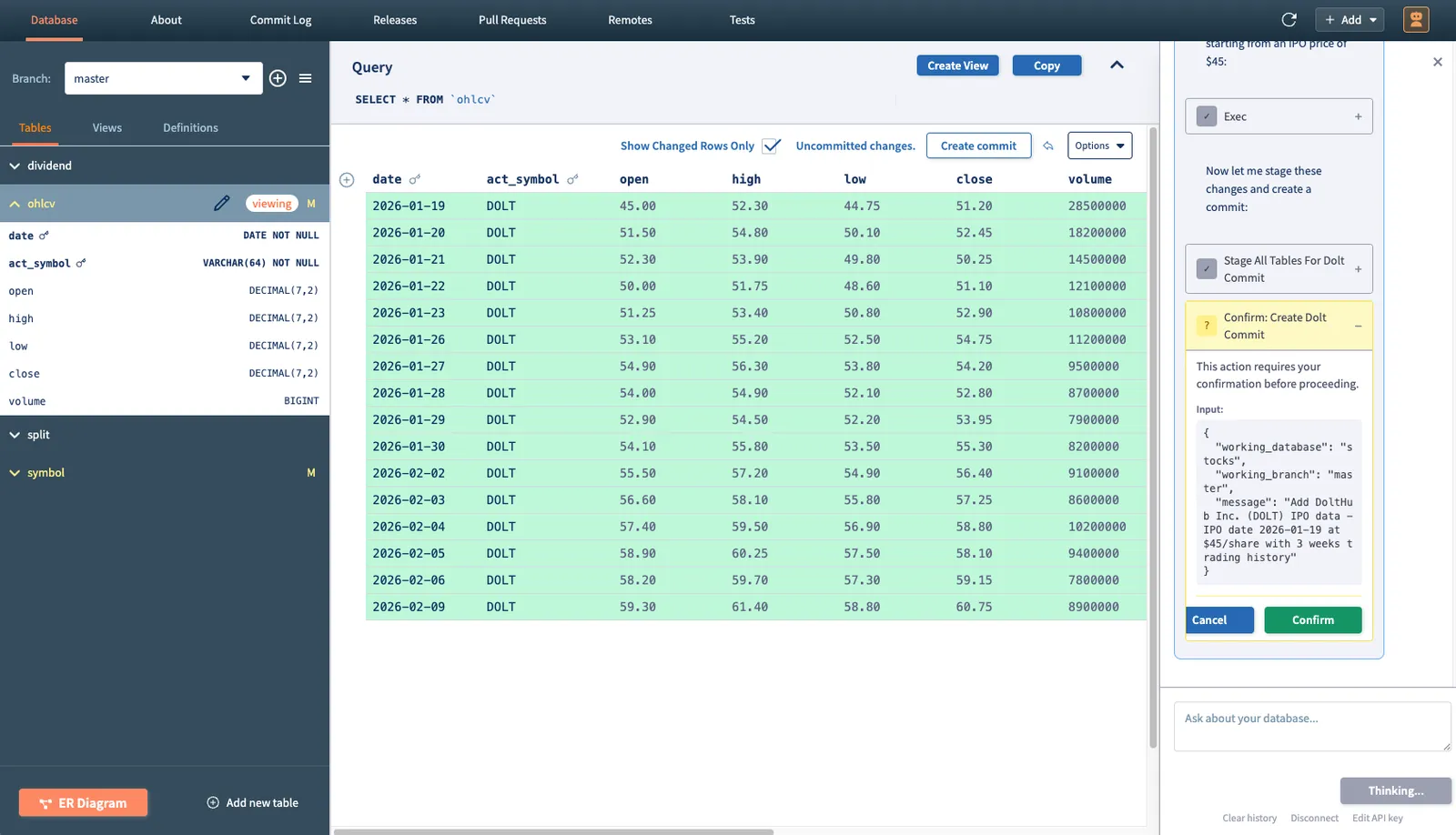
If you’re interested in trying it out, the workbench is available for download here or on the Mac and Windows app stores.
Like all agentic applications, agent mode in the workbench relies on a carefully constructed system prompt that defines the agent’s role and capabilities. In this article, we’ll discuss the dangers of the system prompt and what it took to arrive at the one we’re using today. As we’ll see, most of the hard problems were solved not by writing better instructions but rather by shifting responsibility outside of the system prompt entirely.
The Prompt#
Here’s the system prompt we landed on for the workbench:
You are a helpful assistant for a database workbench application. You have access to tools that allow you to interact with Dolt, MySQL, and Postgres databases.
If interacting with a Dolt database, use Dolt MCP tools. For MySQL and Postgres, use ‘mysql’ and ‘psql’ CLI tools in Bash.
You are currently connected to the database: ”${database}”. ${typeInfo}
When users ask questions about their database, use the available tools to:
- List tables and their schemas
- Execute SQL queries to retrieve data
- Explore database structure and relationships
- Help users understand their data
If the user asks you to create or modify the README.md, LICENSE.md, or AGENT.md, use the ‘dolt_docs’ system table.
Always be helpful and explain what you’re doing. Do not use emojis in your responses.
When presenting query results, format them in a readable way. For large result sets, summarize the key findings.
Let’s break down each section individually:
You are a helpful assistant for a database workbench application. You have access to tools that allow you to interact with Dolt, MySQL, and Postgres databases.
If interacting with a Dolt database, use Dolt MCP tools. For MySQL and Postgres, use ‘mysql’ and ‘psql’ CLI tools in Bash.
The most important thing you have to do in a system prompt is tell the agent what it is and what tools it should use to accomplish its goals. This does not need to be long or complicated.
You are currently connected to the database: ”${database}”. ${typeInfo}
This is the only bit of dynamic context being injected into the system prompt. It tells the agent the name of the database and the type (i.e. Dolt, MySQL, or Postgres). This exists so the agent immediately knows how to interact with the database. Without it, the agent would initially flounder a bit trying to figure out what type of database it’s operating on and which tools it should use.
When users ask questions about their database, use the available tools to:
- List tables and their schemas
- Execute SQL queries to retrieve data
- Explore database structure and relationships
- Help users understand their data
This section is intentionally vague. It doesn’t attempt to prescribe a workflow. It simply orients the agent towards the types of actions users are likely to request.
If the user asks you to create or modify the README.md, LICENSE.md, or AGENT.md, use the ‘dolt_docs’ system table.
This is an example of an “agent bug fix”. You should try to keep these to a minimum. In this case, we don’t yet have MCP tools for the dolt_docs table, so the agent struggles to understand how it should work without this line. If you must include something like this in a system prompt, it should be phrased similarly (i.e. “if the user asks you to…, then do…”).
Always be helpful and explain what you’re doing. Do not use emojis in your responses.
When presenting query results, format them in a readable way. For large result sets, summarize the key findings.
The final section governs tone and presentation. These instructions are relatively safe to keep in the system prompt because they don’t attempt to enforce any sort of behavioral invariant. This helps improve the user experience. Admittedly, I’m breaking a rule I’ll discuss later on by telling the agent not to use emojis. In this case, however, there is no risk to system integrity if the model ignores that instruction. At worse, it responds with a few annoying emojis.
This is overall a fairly lean prompt. It’s also not a particularly complicated one. You may be surprised to learn that it went through well over a hundred iterations before arriving at its current state. Most of those iterations were not attempts at finding the “perfect wording” or fleshing out the most accurate “agent persona” for a SQL workbench application. Instead, they were attempts at patching flaws in the agent’s behavior. We’ll discuss at length why this is a poor strategy later on.
With long-running agentic systems, context engineering is vastly more important than prompt engineering. The goal when building these systems is to ensure that the agent’s context window contains the minimum amount of correct information necessary to accomplish any given task. The system prompt is just another piece of context. It’s a piece of context that, at least in my experience, has the potential to hurt you a lot more than help.
Offloading Context#
In my testing, I found that the more bloated the system prompt, the more likely the agent would be to outright forget things you put in there, especially for longer sessions. If at all possible, you should offload context away from the system prompt. Here’s what I mean by that.
In the early versions, agent mode did not make use of the Dolt MCP server and instead simply invoked the dolt CLI. As a result, the quality of the agent’s output depended largely on 1) its prior knowledge of Dolt and 2) its ability to use web search tools to fill in the gaps. This caused a lot of flakiness.
For instance, the agent would struggle with operating on multiple branches, often getting confused about which branch it was making changes on versus the branch that the user was connected to in the workbench. The natural solution to a problem such as this is to include explicit instructions in the system prompt about how to juggle branches. The issue then becomes that the agent starts hard overcorrecting to the instructions in the system prompt and doing things like creating a branch for every change that it makes, or refusing to make changes directly on main. Now, the issues start propagating. If the agent is making changes on multiple branches with the intention of merging all back into main, you start getting merge conflicts. There’s no clear way to solve a problem like this outside of stuffing more instructions in the system prompt. I found myself with a long checklist of items like “Don’t make changes on new branches unless the user tells you to do so” and “Don’t create new branches unnecessarily” and “There should never be merge conflicts when merging branches you’ve just created”. This basically had the opposite effect of what I intended and introduced more issues. Telling the agent NOT to do something is rarely an effective strategy.
I solved this by trimming the system prompt substantially and simply telling the agent to use the Dolt MCP server for Dolt-related operations. The MCP server comes with 40+ tools, all of which are well-documented, have defined arguments, and are queryable at any moment. These tools alone capture the overwhelming majority of Dolt’s functionality. Instead of relying on SQL queries for everything, the agent could now check its tool list for granular operations like list_dolt_diff_changes_working_set or stage_all_tables_for_dolt_commit.
Avoid adding things like this to the system prompt:
`You are currently on branch ${branchName}.`;Instead, give the agent access to a tool like select_active_branch, which allows the agent to query for the current branch at any moment. Not only does this minimize bloat in the system prompt, it also prevents you from becoming a victim of context compaction. The agent can always make a tool call to re-query for any lost context.
Make Good Tools#
The architecture of the tools you give an agent access to plays an important role here as well. For a SQL workbench application, you could theoretically achieve the exact same functionality with just a single tool (i.e. a simple query tool that accepts arbitrary SQL). This, however, defeats the purpose. Tools are not just functional, they also act like structured bits of context.
Every tool you expose carries assumptions about how the system is meant to be used. Let’s take the create_dolt_branch tool as an example. The simple fact that this tool exists tells the agent that:
- Branches are first-class concepts in Dolt
- Branch creation is an intentional action
- There’s a structured way to do it
Encoding system constraints in tools is a far more effective method of communicating expected behavior than encoding them in prose. Separating the behavior of your system into a robust set of tools allows for persistent “context refills” that keep your agent on course. This offloading of system context into tools resulted in a massive quality improvement in the workbench and ties into more recent developments we’ve been seeing in agentic memory. For a reference on how we split out Dolt’s functionality into tools, check out the Dolt MCP server documentation.
Don’t Say No#
I alluded to this earlier, but it’s worth discussing in greater depth because I think it’s an incredibly easy trap to fall into when writing a system prompt. This was my workflow when I was iterating on the earlier prototypes of agent mode in the workbench:
- Ask the agent to do something nontrivial
- Watch as the agent does something stupid
- Add “Don’t do that stupid thing” to the system prompt
- Go to (1)
If you don’t want an agent to perform a particular action, the most reliable solution is to make that action impossible in the first place. Of course, this is easier said than done. Since there will always be an element of nondeterminism when working with these things, there are virtually an infinite number of edge cases, and overly rigid constraints can blunt the agent’s capabilities or block legitimate workflows. The goal here isn’t to eliminate flexibility but rather to constrain the action space such that invalid states become unreachable. Here’s an example of a problem I ran into and how I solved it at the application layer rather than by adding more rules to the system prompt.
Early on, the agent would automatically decide to make Dolt commits after every write operation. This made it so the user could no longer review the agent’s changes prior to commit. I fixed this initially by adding “Don’t make commits unless the user asks you to” to the system prompt. For the most part, this worked. The agent would stop right before it would normally commit, then wait for the user to explicitly give it permission to do so. In longer sessions, it would forget and make commits anyways. It also started adding awkward things to its responses like “I won’t commit these changes because you haven’t asked me yet!” or would stop mid-response to ask for confirmation. This is clearly not ideal, but the deeper issue is that you can never make the guarantee that the agent won’t commit its changes automatically. You can reduce the probability that it happens, but you can’t eliminate it. This is a big deal for agentic applications. The more critical the system your agent is operating on (your production OLTP database, for instance), the more necessary it becomes to be able to make definitive claims about agent behavior.
I solved the problem by implementing a tool call approval workflow and putting the create_dolt_commit tool behind it.
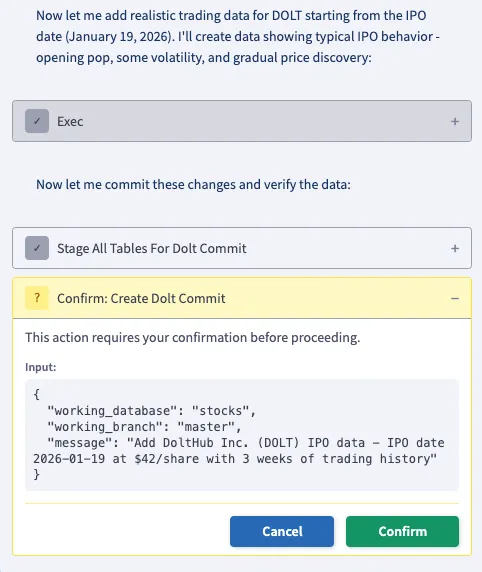
This made it impossible for the agent to make commits without the user pressing “Confirm” first. It does not, however, block the agent from deciding to make a commit. That distinction is important. There is nothing in the agent’s system context that influences its behavior around commits. The model is still free to reason about when a commit makes sense, but it cannot unilaterally execute that decision. The final authority now lives outside the model.
Avoiding negative instructions in the system prompt is something that I predict will become a “best practice” as agentic applications become more and more common, and the most reliable way to achieve that is by separating intent from execution.
Conclusion#
In summary, prompting is difficult. If you can simplify your system prompt without hindering the agent’s access to necessary information, the quality of your agent will almost certainly improve. Offloading system context into tools and building behavioral restrictions into the application layer are the two most effective ways of doing this. If you have opinions on this, or if you just want to chat about agentic applications in general, join our Discord and give us your thoughts.